Website and infrastructure monitoring gives you instant visibility into every layer of your online presence — from whether your site is reachable to whether your SSL certificate is about to expire. This complete setup guide covers every monitoring type available in MonitoringDaddy and links to step-by-step instructions for each one.
What Is Website and Infrastructure Monitoring?
Monitoring is the practice of automatically and continuously checking your digital assets — websites, servers, APIs, domains, SSL certificates, and page content — from external locations, and alerting you the moment something goes wrong. Rather than waiting for a customer complaint or a search-engine penalty, you know about an outage or misconfiguration in seconds.
A good monitoring strategy covers multiple layers. Your website can be technically reachable while your SSL certificate is three days from expiry, or your server can be running while an API endpoint silently returns errors. Each monitoring type catches a different class of failure, and together they form a safety net around your entire infrastructure.
Types of Monitoring — and What Each One Does
1. Website Uptime Monitoring
Uptime monitoring sends regular HTTP(S) requests to your website and verifies that it responds with a healthy status code. If your site goes down, times out, or returns a server error, you receive an alert instantly — before your visitors, customers, or search engines notice. It is the foundation of any monitoring setup and the first check you should configure for every domain you own.
Read the complete uptime monitoring setup guide →
2. SSL Certificate Monitoring
An expired SSL certificate kills visitor trust immediately — browsers display full-page "Not Secure" warnings that drive users away and tank conversions. SSL certificate monitoring tracks the expiry date of every certificate on your domains and sends you advance warnings (for example, 30, 14, and 7 days before expiry) so you never get caught off guard. It also detects unexpected certificate changes that may indicate a misconfiguration or a security event.
Read the complete SSL certificate monitoring setup guide →
3. Domain Monitoring
Domains expire, and an expired domain can be snatched by a third party within hours of the grace period ending. Domain monitoring watches your WHOIS registration data and alerts you well ahead of the renewal deadline, giving you time to renew through your registrar without any lapse. It can also flag unexpected changes to name-server records — an early warning sign of domain hijacking.
Read the complete domain monitoring setup guide →
4. Server Monitoring
Server monitoring checks the health of your server or application at the HTTP level — verifying that a specific endpoint returns the expected status and, optionally, the expected content. It is ideal for monitoring internal services, background workers, scheduled jobs, and microservice health-check endpoints that sit behind your main website. Pair it with uptime monitoring to cover both the public face and the back-end infrastructure of your application.
Read the complete server monitoring setup guide →
5. REST API Monitoring
APIs are the backbone of modern web applications, yet they are often the first thing to break silently. REST API monitoring sends real HTTP requests — GET, POST, PUT, DELETE — to your API endpoints, validates the response status code, and can verify that the response body contains the expected data. If your payment API, authentication service, or any critical integration goes down, you find out immediately rather than from a flood of support tickets.
Read the complete REST API monitoring setup guide →
6. Keyword / Content Monitoring
A website can return a perfectly healthy 200 OK status while actually displaying a database error, a "sold out" message, or corrupted content — because the server itself is up, but the application layer has failed. Keyword monitoring fetches your page and checks whether a specific piece of text is present or absent. You decide the condition: "page must contain Welcome" or "page must not contain Error 500." If the condition is violated, an alert fires.
Read the complete keyword monitoring setup guide →
7. Price Monitoring
Price monitoring is a specialised form of content monitoring that tracks numerical prices on product or service pages and alerts you when a price changes. It is equally useful for monitoring your own prices (catching unintended changes from a CMS edit or a pricing-engine bug) and for tracking competitor pricing so your team can respond quickly to market moves.
Read the complete price monitoring setup guide →
8. Self-Hosted Status Pages
A status page lets you communicate service health to your users, customers, and stakeholders in real time. MonitoringDaddy lets you create a public or password-protected status page on your own domain, powered by your existing monitors. Instead of fielding "is your site down?" messages, you can direct users to a branded, always-accurate status page that updates automatically as your monitor states change.
Read the complete status page setup guide →
Comparing Monitoring Types at a Glance
| Monitor Type | What It Checks | Primary Alert Trigger | Recommended For |
|---|---|---|---|
| Uptime | Site availability & HTTP status | Site unreachable or 5xx error | Every public website |
| SSL Certificate | Certificate expiry & validity | Expiry within X days | Any HTTPS domain |
| Domain | WHOIS expiry & name-server records | Renewal deadline approaching | Every registered domain |
| Server | Server/application health endpoint | Endpoint down or unhealthy | Back-end services & microservices |
| REST API | API response status & body | Non-2xx status or bad response | APIs & integrations |
| Keyword | Page content (text present/absent) | Keyword missing or unexpected | Dynamic pages & CMS sites |
| Price | Numerical price on a page | Price change detected | E-commerce & competitor tracking |
| Status Page | Aggregated monitor status | Incident or degraded state | Any public-facing service |
How to Choose What to Monitor First
If you are new to MonitoringDaddy, the following priority order covers the most common failure modes before moving into more advanced checks:
- Uptime monitoring — set this up for every public URL you own. It is the single most impactful check and the fastest to configure.
- SSL certificate monitoring — add this for every HTTPS domain. Certificate expiry is a silent killer that an uptime check alone will not catch until it is too late.
- Domain monitoring — a lapsed domain can be registered by anyone. A simple domain monitor prevents a very preventable catastrophe.
- REST API or server monitoring — once your public face is covered, move to back-end services and integrations that your application depends on.
- Keyword or price monitoring — add these for pages where content accuracy is business-critical: checkout flows, product pages, or login screens.
- Status page — once several monitors are running, create a status page so your team and your customers always have a live, authoritative view of your service health.
General Setup Workflow
Every monitor type starts from the same place. This is the order we recommend for a new account, with the real screens.
Step 1: Start from the dashboard
The dashboard counts your monitors, status pages and incidents and lists the latest of each. New monitor and Watch a page are at the top.
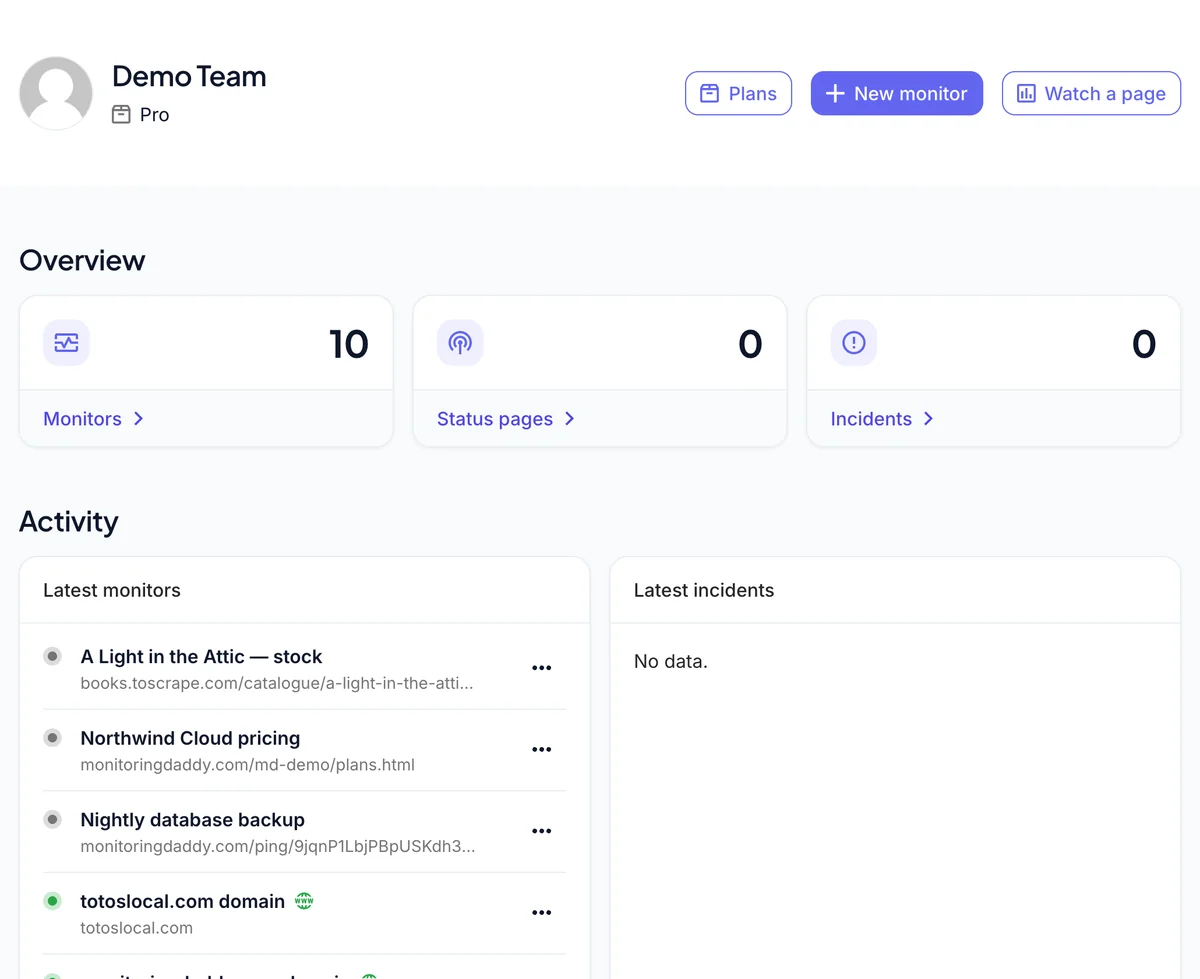 The dashboard: counts, latest monitors and latest incidents.
Step 2: Add an uptime monitor for your most important page
Monitors → New: name, URL, interval and an alert condition. See the uptime setup guide.
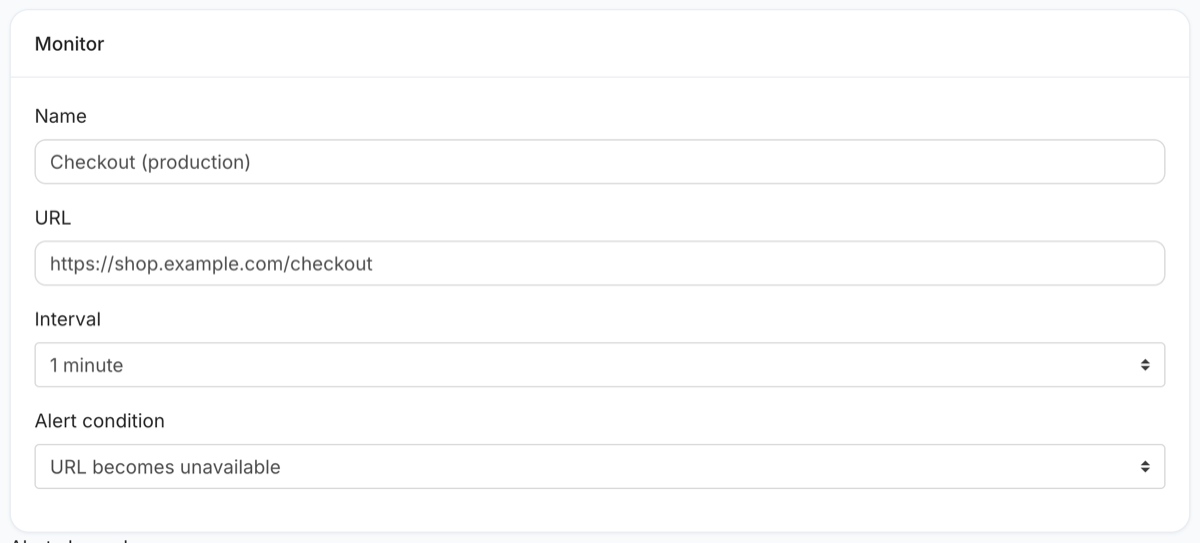 The uptime form.
Step 3: Add the certificate and the domain
Each has its own list under Monitors → SSL and Monitors → Domain expiry, with the expiry date and a warning window.
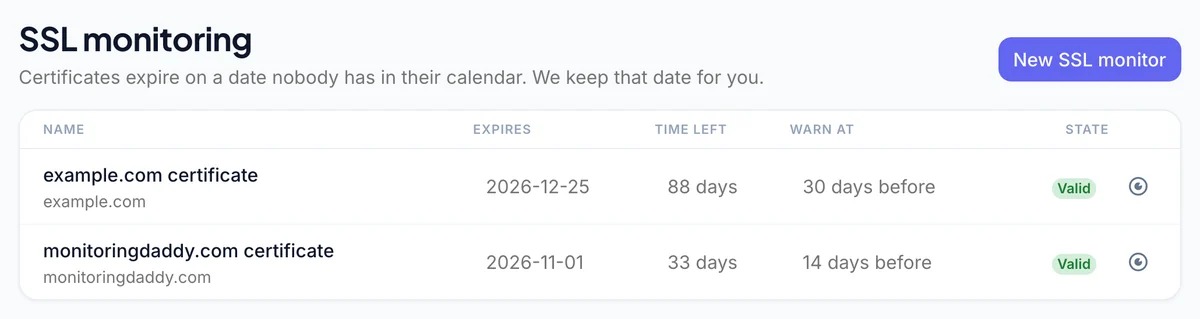 Certificates with their expiry dates.
Step 4: Add alert channels everywhere
Every monitor has its own channels — email, Slack, Microsoft Teams, Discord, Flock, Telegram or a webhook. Two per monitor is a good rule.
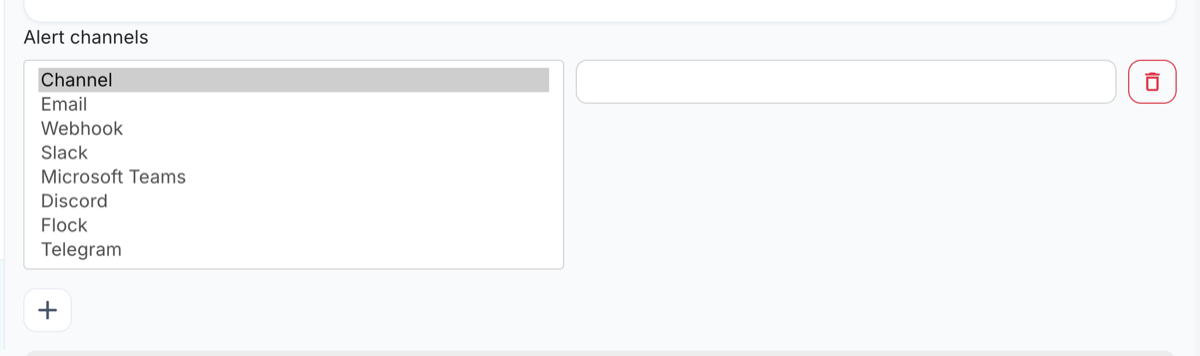 Alert channel types.
Step 5: Add what an uptime check cannot see
Page watches for content changes, heartbeats for cron jobs, and API monitors for endpoints. They all appear in the same Monitors list.
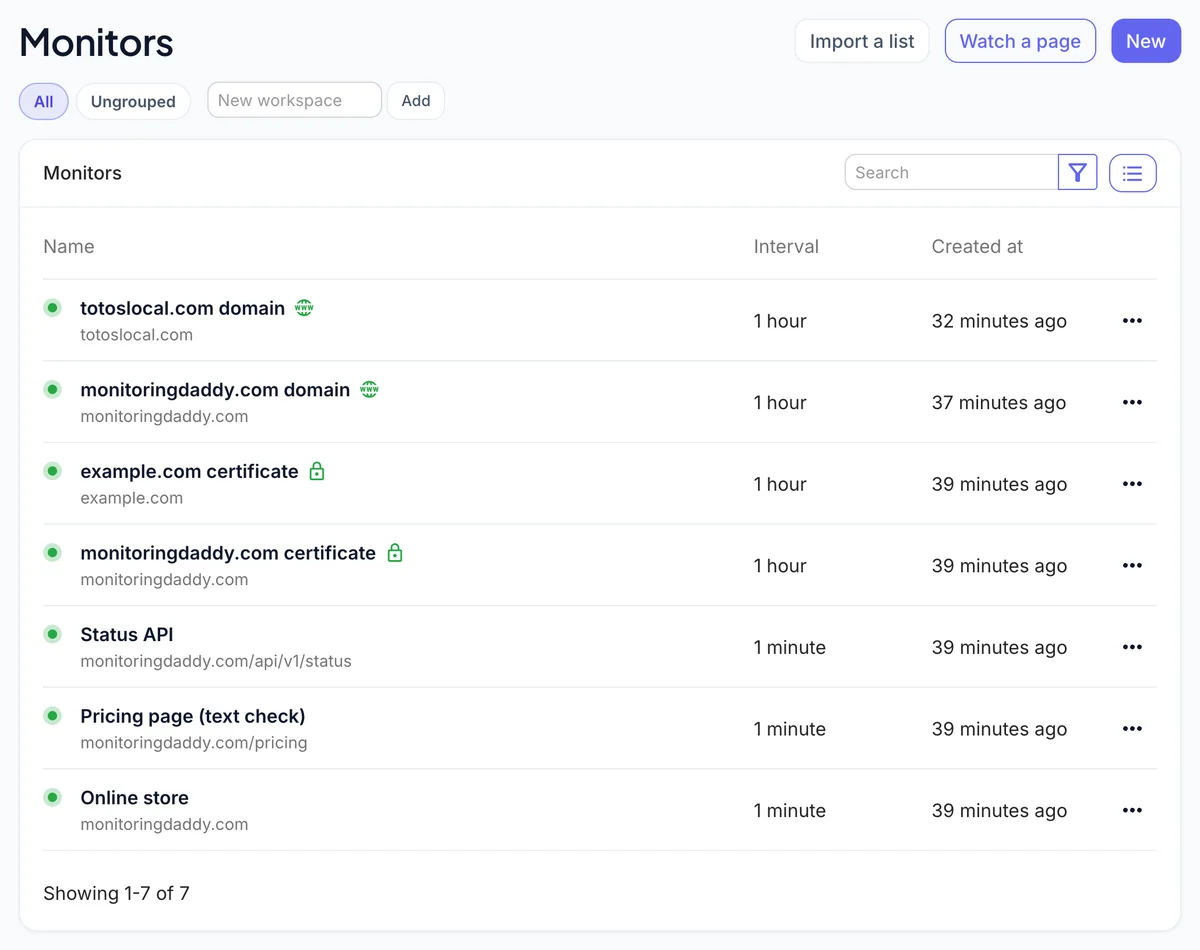 All monitor types in one list.
Best Practices for Effective Monitoring
- Layer your checks. Use uptime, SSL, and domain monitoring together for every domain. Each type catches failures the others will miss.
- Monitor what users actually see. Add keyword monitoring to key conversion pages — cart, checkout, login — not just your homepage.
- Use short intervals for critical paths. A 1-minute interval on a payment API means at most 60 seconds of undetected downtime. On a staging site, 15 minutes is fine.
- Set advance expiry warnings. Configure SSL and domain alerts to fire at 30, 14, and 7 days before expiry. The earlier alert gives you time to act without urgency; the 7-day alert is a final backstop.
- Name monitors consistently. A naming convention like
[Asset] — [Check type](for example,api.example.com — REST API) makes it easy to scan your dashboard at a glance. - Dedicate a health endpoint. For server and API monitors, expose a lightweight
/healthor/statusendpoint that returns a 200 response only when all dependencies are healthy. This gives you a more meaningful signal than a homepage HTTP check. - Review and update monitors after deployments. A URL change, a new API version, or a domain migration can silently break existing checks.
Next Steps
Choose the guide that matches the first asset you want to protect and follow the step-by-step instructions. You can be live with your first monitor in under five minutes.
- Set up website uptime monitoring — the essential starting point
- Set up SSL certificate monitoring — prevent the "Not Secure" warning
- Set up domain monitoring — never let a domain lapse
- Set up server monitoring — watch your back-end services
- Set up REST API monitoring — keep integrations healthy
- Set up keyword monitoring — verify page content in real time
- Set up price monitoring — track product and competitor prices
- Set up a status page — communicate health to your users
Not yet on MonitoringDaddy? See our pricing plans — there is a free tier to get you started with no credit card required.
Frequently Asked Questions
What is the difference between uptime monitoring and server monitoring?
Uptime monitoring checks whether a public-facing website URL responds with a healthy HTTP status and is primarily aimed at detecting site-wide outages visible to end users. Server monitoring targets internal health-check endpoints, background services, and microservices that may not be directly visible to the public but are critical to your application's operation. Both complement each other and are often used together.
How many monitors do I need for a typical website?
At a minimum, configure three monitors for every domain: an uptime monitor for the main URL, an SSL certificate monitor to track the certificate expiry, and a domain monitor to track the registration expiry. For sites with important dynamic pages (checkout, login, product listings) or back-end APIs, add keyword and REST API monitors as well.
Can MonitoringDaddy alert me via Slack or Microsoft Teams?
Yes. MonitoringDaddy supports webhook-based alerting, which means you can send notifications to Slack, Microsoft Teams, Discord, PagerDuty, or any platform that accepts an incoming HTTP POST. You configure the webhook URL in the alert channel settings when creating or editing a monitor.
How far in advance will I be warned about an SSL certificate or domain expiry?
You control the warning thresholds. Most users configure alerts at 30, 14, and 7 days before expiry so they have multiple opportunities to renew before the deadline. MonitoringDaddy will send an alert each time a threshold is crossed.
What is keyword monitoring and when should I use it?
Keyword monitoring fetches your page and checks whether a specific piece of text is present or absent in the HTML response. Use it whenever a correct HTTP 200 status alone does not guarantee the page is working — for example, on checkout pages, login screens, or any page that could silently display an error message or incorrect content while the server remains technically online.
Does monitoring affect my website's performance or server load?
The impact is negligible. Each check is a single lightweight HTTP request, identical to one real visitor loading your page. At a 5-minute interval that amounts to 12 requests per hour — far less traffic than a typical busy minute on a live website. Using a dedicated health-check endpoint (rather than a full page) reduces the load even further.
Can I monitor websites and APIs that require authentication or custom headers?
Yes. MonitoringDaddy supports custom HTTP headers and authentication on uptime, server, and REST API monitors. You can pass API keys via headers, use basic authentication, or include any custom headers your endpoint requires. For sensitive credentials, keep the values in the header fields within your monitor settings rather than embedding them in the URL.
What is a status page and do I need one?
A status page is a public or private web page that shows the real-time health of your services, powered directly by your MonitoringDaddy monitors. It is not strictly required, but it is strongly recommended for any business with external users or customers. When an incident occurs, a status page reduces support ticket volume, builds trust, and lets your team focus on resolving the issue instead of answering "is everything down?" messages.