SSL certificate monitoring automatically checks your certificate's expiry date, issuer, and chain validity — and alerts you days or weeks before it expires, so you never show a "Not Secure" warning to visitors. This guide walks you through exactly how to set up SSL certificate monitoring in MonitoringDaddy, field by field.
What Is SSL Certificate Monitoring?
SSL certificate monitoring is a continuous automated check that inspects the TLS/SSL certificate installed on your website or API endpoint. Unlike basic website uptime monitoring, which only verifies that a URL responds with a healthy HTTP status code, SSL monitoring digs into the certificate itself and verifies:
- The expiry date — is the certificate still valid, and how many days remain?
- The issuer and trust chain — is the certificate issued by a recognized Certificate Authority?
- The hostname match — does the certificate's Common Name or SAN cover the monitored domain?
When any of these checks fail — or when the expiry date crosses the warning threshold you configure — MonitoringDaddy fires an alert to every channel you've added, giving you plenty of time to renew before users are affected.
Why an Expired SSL Certificate Is Dangerous
Letting an SSL certificate expire silently is one of the most avoidable causes of website incidents. The consequences are immediate and severe:
Browser Security Warnings
All major browsers — Chrome, Firefox, Safari, and Edge — block access to sites with expired or untrusted certificates and display a full-screen "Your connection is not private" or "Not Secure" interstitial. Most visitors leave immediately rather than click through the warning, causing traffic to drop to near zero within minutes of expiry.
Lost User Trust and Conversions
Even users who are technically savvy enough to bypass the warning will hesitate to enter login credentials, payment details, or personal information on a site that fails HTTPS validation. A single expiry incident can permanently damage customer confidence — especially in e-commerce, SaaS, and financial applications.
SEO and Ranking Impact
Google uses HTTPS as a ranking signal. While a brief certificate lapse may not immediately tank rankings, a sustained outage (or one that causes Googlebot to be unable to crawl your site) can result in de-indexing and ranking drops that take weeks to recover from after you renew.
API and Integration Failures
It's not just browsers. Any client that connects over HTTPS — mobile apps, third-party integrations, payment gateways, and CI/CD pipelines — will throw SSL handshake errors when your certificate expires. This can silently break order processing, authentication flows, and data synchronization.
How SSL Certificate Monitoring Works
MonitoringDaddy connects to your server over HTTPS at your chosen interval and performs a TLS handshake. During that handshake, it reads the certificate presented by your server and extracts the notAfter field — the hard expiry timestamp. It then calculates the number of days remaining and compares it against your configured alert threshold.
The check runs from external infrastructure, so it reflects exactly what a real browser or API client would see — including issues caused by misconfigured CDN or reverse proxy configurations that might serve a different certificate than the one installed on your origin server.
Before You Begin
- Your website or API endpoint must already be accessible over
https://. - An SSL certificate must be installed and currently valid (MonitoringDaddy monitors expiry — it does not install certificates).
- Decide how many days in advance you want expiry alerts: 30 days is recommended for most sites; 60 days for business-critical or high-traffic systems.
- Have at least one alert channel ready — an email address, or a Slack, Discord, or Microsoft Teams webhook.
- If you also want to track your domain registration expiry separately, see domain monitoring — it's a distinct feature covered in its own guide.
Step-by-Step SSL Certificate Monitoring Setup
SSL certificates are their own monitor type in MonitoringDaddy. The form is short — four fields — because a certificate check does not need an interval, a request method or headers: it reads the certificate the server presents.
Step 1: Open Monitors → SSL
The SSL list shows every certificate you monitor with its expiry date, the days left and when it will warn you. Click New SSL monitor.
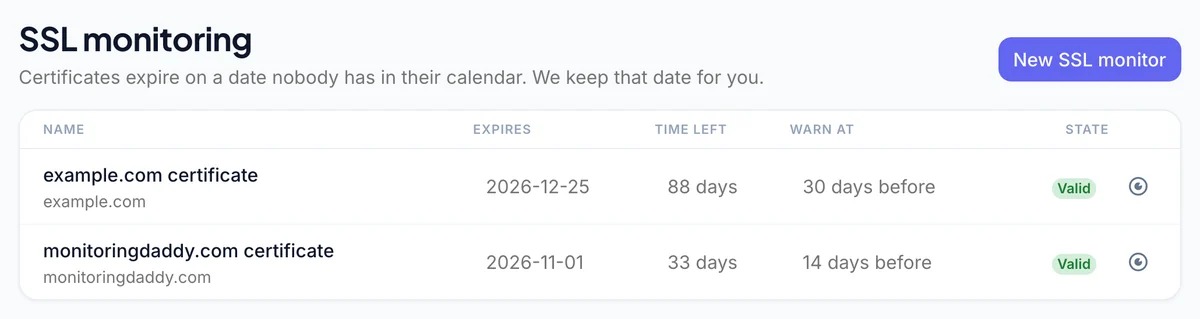 The SSL list: expiry date, time left and warning window for each certificate.
Step 2: Name and URL
Name it so an alert is self-explanatory — api.example.com certificate beats SSL 3 — and enter the full https:// address. Use one monitor per hostname that receives real traffic: a wildcard certificate is still served separately by every host, and a host can be serving an old copy.
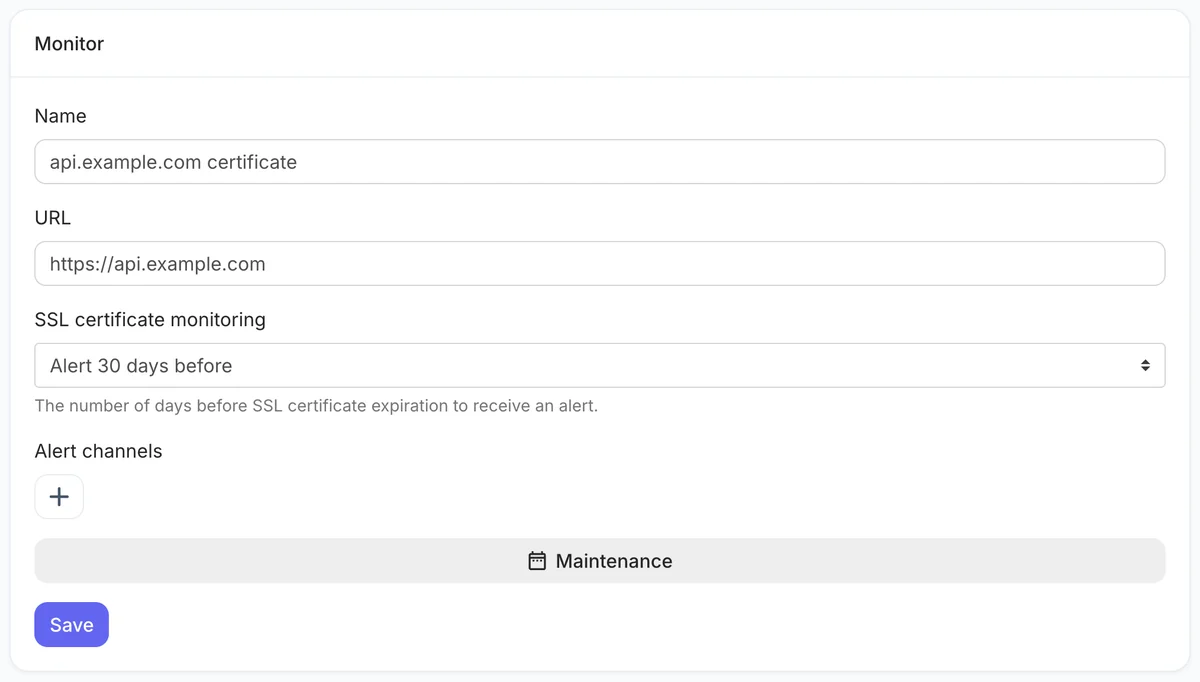 The whole SSL form: name, address, warning window, channels.
Step 3: Choose the warning window
Under SSL certificate monitoring, choose Alert 1, 2, 3, 7, 14, 30 or 60 days before expiry. Pick 14 days when renewal is automatic (the alert then means the automation failed) and 30 days when a person renews it. Choosing Off stops the expiry warning.
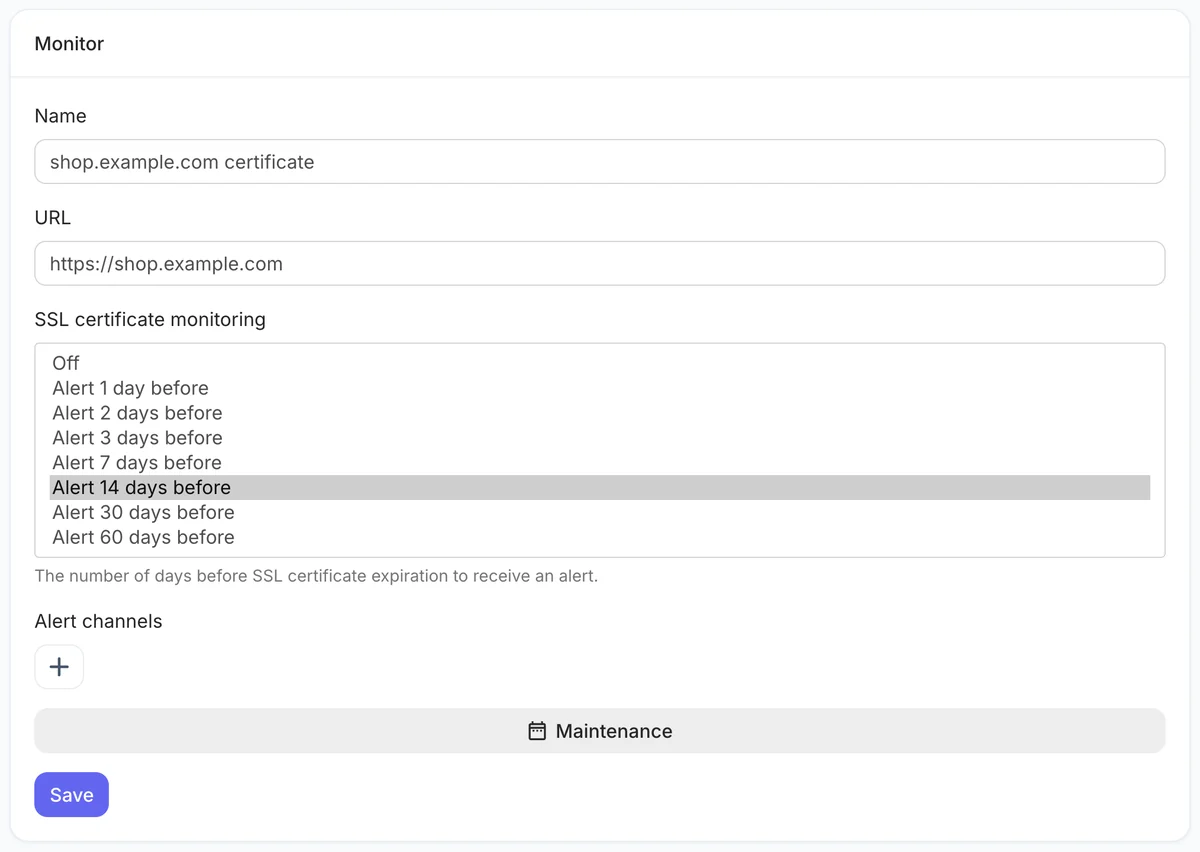 The warning window options.
Step 4: Add alert channels
Click + under Alert channels and add email plus a team channel — Slack, Microsoft Teams, Discord, Flock, Telegram or a webhook. Certificates expire in the gap between teams, so a shared channel is worth more here than anywhere.
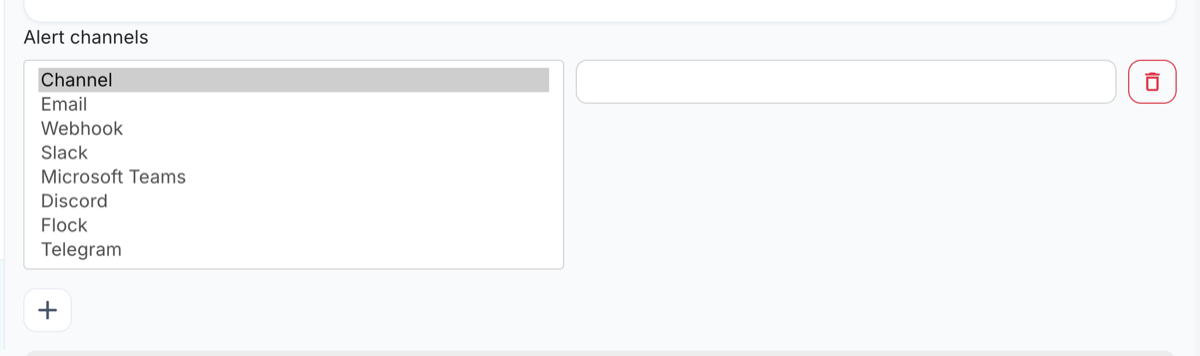 Every alert channel type.
Step 5: Save
The certificate is read once a day. The expiry date appears in the SSL list after the first read.
Recommended SSL Certificate Monitoring Configuration
| Setting | Recommended |
|---|---|
| Name | example.com certificate |
| URL | https://example.com |
| SSL certificate monitoring | Alert 30 days before (14 if renewal is automated) |
| Alert channels | Email + a team chat channel |
| Maintenance | Leave empty unless you are migrating the certificate |
Once saved, the certificate is read daily. You are alerted once when it enters your warning window, once more if it actually expires, and the warning re-arms by itself when a renewed certificate is detected. If the certificate cannot be read two days in a row — DNS removed, port closed, host gone — you receive a "check failed" alert instead of silence. MonitoringDaddy reads the certificate the host serves; it does not validate the intermediate chain.
Best Practices for SSL Certificate Management
Use a 30–60 Day Alert Lead Time
Thirty days is the widely accepted minimum warning period. It gives you enough time to place a renewal order, complete domain validation (DV, OV, or EV), wait for issuance, deploy the new certificate, and verify the install — even if something goes wrong on the first attempt. For EV certificates or those requiring legal document review, 60 days is safer.
Automate Renewal with Let's Encrypt and Certbot
Let's Encrypt issues free 90-day certificates and provides Certbot, an ACME client that automates renewal. Even with automated renewal, SSL monitoring is still essential — automation can silently fail due to firewall changes, DNS misconfigurations, or certificate propagation delays. MonitoringDaddy acts as an independent watchdog that confirms what the client actually sees.
0 0,12 * * * root certbot renew --quiet
Monitor Wildcard and SAN Certificates Individually
A wildcard certificate (*.example.com) or a Subject Alternative Name (SAN) certificate covers multiple hostnames under a single certificate. However, if that certificate is replaced or renewed, the change may roll out at different times across different subdomains, CDN edges, or load balancer nodes. Monitor each critical subdomain separately to catch partial rollout failures.
Check Your CDN and Proxy Layer
If you use a CDN (Cloudflare, Fastly, CloudFront), the certificate your users see is the CDN's certificate — not the one on your origin server. Make sure you have SSL monitors pointing at the public-facing CDN hostname, not just your origin IP. CDN-managed certificates are typically auto-renewed, but manual or uploaded certificates on CDN layers expire just like any other.
Troubleshooting Common SSL Monitoring Issues
Alert Fires Even Though Certificate Is Valid
Check whether your server is serving a certificate for a different hostname than the URL you entered. This commonly happens when a reverse proxy or CDN serves a default certificate that does not include your domain in its SAN list. Use openssl s_client to inspect the exact certificate your server presents:
No Alert Received Near Expiry
Verify that your alert channel is configured correctly and that the email address or webhook URL is still active. Test the channel from within MonitoringDaddy. Also confirm that your expiry alert threshold (Step 5) is set high enough — if you set 15 days and the certificate was renewed with 20 days remaining, no alert would have fired.
Monitor Shows "Certificate Expired" But Site Loads Fine
This usually means your CDN or load balancer is serving a cached or secondary certificate. MonitoringDaddy connects directly to the URL you provided — if that URL goes through infrastructure that caches TLS sessions, there can be a brief lag. Wait for the next check cycle or force a fresh TLS session by appending a query parameter to the URL.
Next Steps
With SSL certificate monitoring in place, your certificate expiry is fully covered. For complete end-to-end protection, consider setting up these additional monitors:
- Website uptime monitoring — detect downtime within minutes, independent of SSL status
- Domain monitoring — get advance notice before your domain registration expires
- Free SSL monitoring tool — run a one-time SSL check on any domain without creating an account
Together, SSL monitoring, uptime monitoring, and domain monitoring cover the three most common causes of unexpected website outages. See the pricing page for details on monitor limits and alert channel options across all plans.
Frequently Asked Questions
What is SSL certificate monitoring?
SSL certificate monitoring is an automated service that connects to your website or API over HTTPS at regular intervals, reads the installed TLS certificate, and alerts you when the expiry date falls within your configured warning threshold — for example, 30 days before expiry. It ensures you never miss a renewal deadline.
How many days before expiry should I set my SSL alert?
30 days is recommended for most production websites and is aligned with industry best practice. Use 60 days for business-critical systems like e-commerce checkouts or financial APIs. 15 days is the minimum safe threshold and is only suitable if your certificate renewal is fully automated and tested.
Will I receive multiple alerts or just one before the certificate expires?
MonitoringDaddy sends an alert each time it runs a check and finds the certificate within your warning window. If your check interval is 15 minutes and your threshold is 30 days, you will receive repeated alerts at each check cycle until the certificate is renewed. This ensures the notification reaches you even if earlier alerts go unread.
Do I need separate monitors for SSL and uptime?
Not necessarily — you can enable both SSL monitoring and URL availability alerts on the same monitor. However, if you already run a dedicated uptime check on the same URL, it is cleaner to disable the URL availability alert on your SSL monitor to avoid duplicate notifications for the same downtime event.
Does SSL certificate monitoring work with Let's Encrypt and auto-renewed certificates?
Yes, and it is especially valuable for auto-renewed certificates. Automation can silently fail due to firewall changes, DNS updates, or ACME challenge errors, causing the certificate to expire even when Certbot is installed. MonitoringDaddy acts as an independent check that catches these failures before users see a warning.
Can I monitor wildcard and SAN certificates?
Yes. Enter any hostname covered by the wildcard or SAN certificate as the monitored URL. MonitoringDaddy will check the certificate presented for that specific hostname. It is best practice to monitor each critical subdomain separately, since CDN edge nodes and load balancers may serve different certificates for different subdomains even within the same wildcard.
What is the difference between SSL monitoring and domain monitoring?
SSL monitoring tracks the expiry of your TLS certificate — the cryptographic credential that enables HTTPS. Domain monitoring tracks the expiry of your domain registration with your registrar. These are managed by completely different systems and can expire independently. MonitoringDaddy treats them as separate features so you can enable each one where it is needed.
Is the free SSL monitoring tool different from setting up a monitor?
Yes. The free SSL monitoring tool performs a one-time, on-demand check of any domain's certificate and shows you the expiry date, issuer, and days remaining — no account required. Setting up a monitor in MonitoringDaddy runs this check automatically on a recurring schedule and sends you alerts, giving you ongoing protection rather than a single snapshot.