Domain monitoring automatically tracks your domain name's expiration date via WHOIS lookups and alerts you well before it lapses — preventing website outages, broken email, and the risk of permanently losing a domain you've built your brand on. This step-by-step guide shows you exactly how to set up domain monitoring in MonitoringDaddy in just a few minutes.
What Is Domain Name Monitoring?
Domain name monitoring is an automated service that periodically queries the WHOIS registry for your domain and records its expiration date. When the expiry date falls within your configured alert window — say, 30 days from now — MonitoringDaddy fires an alert so you have enough time to log in to your registrar and renew before anything breaks.
Unlike website uptime monitoring, which checks whether your server is responding at this moment, domain monitoring focuses entirely on the registration lifecycle of the domain itself. The two work as a complementary pair: uptime monitoring catches server-level failures; domain monitoring catches registration-level failures.
Why Domain Expiry Matters More Than You Think
A forgotten domain renewal is surprisingly common — and the consequences are severe:
- Website goes offline. DNS records stop resolving the moment a domain enters the grace or redemption period.
- Email stops working. MX records depend on a live domain; expired domains break every email address on that domain instantly.
- SEO damage. Search engines de-index unreachable sites quickly, and recovering lost rankings can take months.
- Brand hijacking risk. Domain drop-catchers monitor expiring domains 24/7 and can snap up your domain within hours of it lapsing.
- Redemption fees are expensive. Most registrars charge $80–$200 or more to recover a domain in the redemption grace period — if recovery is even possible.
How Domain Monitoring Works
MonitoringDaddy uses WHOIS protocol queries to fetch authoritative registration data for your domain at the interval you choose. Here is what happens under the hood:
- At each check interval, the platform sends a WHOIS query to the authoritative registry for your domain's TLD (e.g., Verisign for
.com, Nominet for.co.uk). - The response is parsed for the
Registry Expiry Date(orExpiration Datefield, depending on the registry format). - The expiry date is compared against the current date to calculate days remaining.
- If days remaining falls at or below your configured threshold (e.g., 30 days), an alert is sent to all configured alert channels.
- Alerts continue on each check until the domain is renewed and the new expiry date is reflected in WHOIS.
Because domain registrations change slowly, a 15-minute check interval is more than sufficient — there is no need for 1-minute polling as you might use for uptime checks.
Domain Monitoring vs. SSL Certificate Monitoring
These two monitors are often confused but track completely different assets. If you want full coverage, you should run both:
- Domain monitoring — tracks the WHOIS expiry date of the domain registration itself.
- SSL certificate monitoring — tracks the TLS certificate expiry date served over HTTPS on port 443.
A domain can be fully registered and live while its SSL certificate has expired (causing browser security warnings), and vice versa. Enable both for end-to-end protection.
Before You Begin
- Confirm your domain is currently active and registered (check your registrar's dashboard).
- Have the root domain name ready — use the bare domain without any protocol or path (e.g.,
example.com, nothttps://example.com/). - Decide your alert lead time — how many days before expiry you want to start receiving warnings.
- Have at least one alert channel configured (an email address or a webhook URL for Slack, Discord, or similar).
- Note your domain's current expiry date so you can verify the monitor picks it up correctly after setup.
How to Set Up Domain Monitoring — Step by Step
Domain registrations are their own monitor type. The screenshots below use two of our own domains and their real registry dates.
Step 1: Open Monitors → Domain expiry
The list shows each domain's registry expiry date, the days left and your warning window. Click New domain monitor.
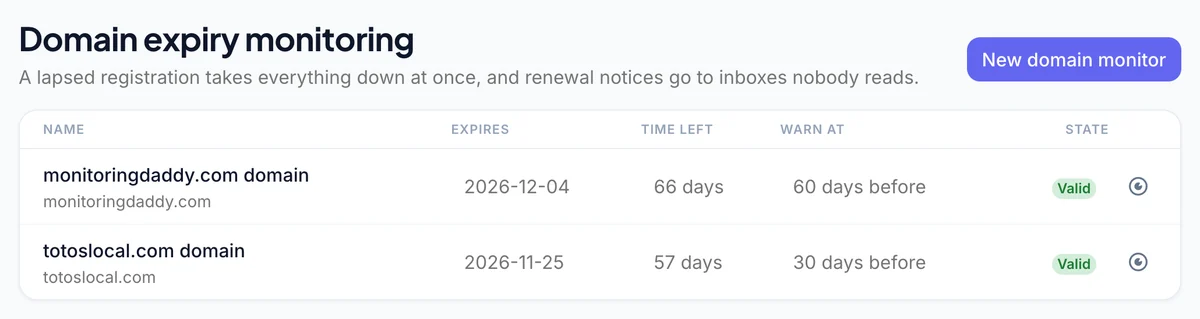 Our own domains, read from the registry.
Step 2: Name and URL
Enter the domain as an https:// address, for example https://example.com. One monitor per registered domain is enough — subdomains share the parent's registration.
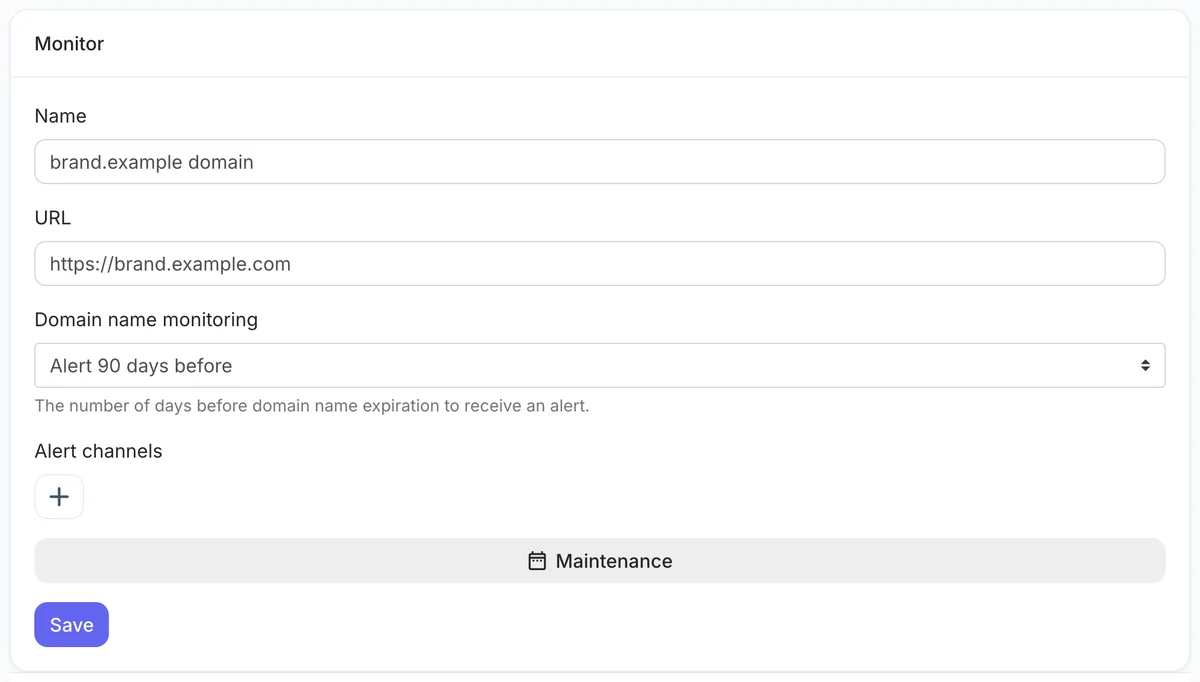 Name, address and warning window.
Step 3: Choose the warning window
Under Domain name monitoring, choose anything from 1 day to 180 days before expiry. For the domain your website and email run on, 60 to 90 days leaves room for an expired card or a registrar asking for re-verification.
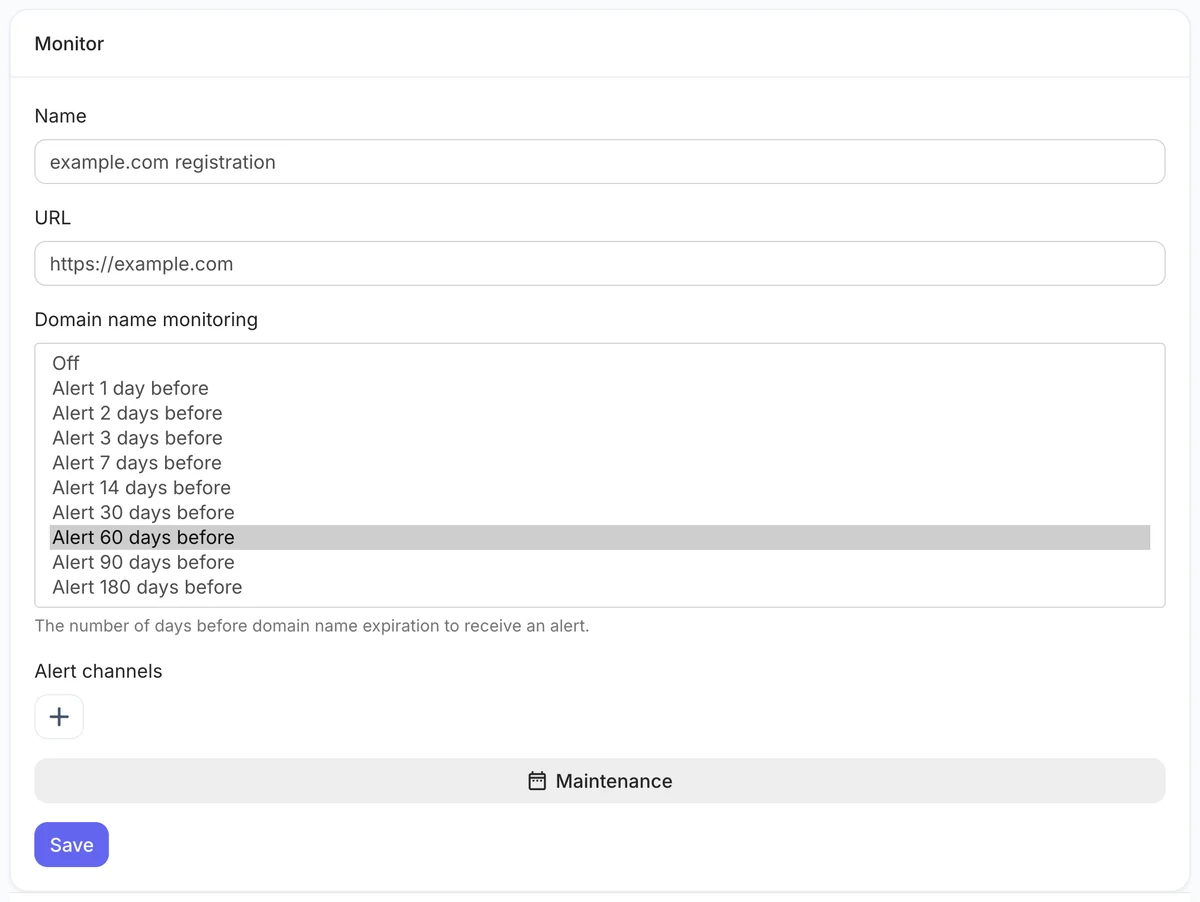 Warning windows run up to 180 days.
Step 4: Send alerts somewhere off the domain
If the domain lapses, email on it stops too. Add a personal address or a Slack, Teams or Discord channel alongside your work email.
Step 5: Save
The registration is looked up once a day and the expiry date appears in the list after the first lookup.
Recommended Domain Monitoring Configuration
| Setting | Recommended |
|---|---|
| Name | example.com domain |
| URL | https://example.com |
| Domain name monitoring | Alert 90 days before (60 minimum for a business domain) |
| Alert channels | An address not on this domain + a team chat channel |
Once saved, WHOIS is checked daily. You are alerted once when the domain enters your window and once more if it expires anyway; the warning re-arms after a renewal moves the date. WHOIS servers are unreliable, so a lookup has to fail three days running before you get a "check failed" alert. For the certificate on the same hostname, add a separate SSL monitor.
Best Practices for Domain Expiry Management
Enable Auto-Renew at Your Registrar
Domain monitoring is your safety net — but auto-renew at your registrar is your first line of defense. Log in to your registrar and confirm that auto-renew is enabled and that a valid, up-to-date payment method is attached. Even with auto-renew on, monitoring provides a backup alert in case the payment fails silently.
Set the Renewal Lead Time to Match Your Workflow
If your renewal process involves procurement approvals, finance sign-offs, or client coordination, set your alert window to 60 or even 90 days. Registrar grace periods are not a safety buffer — they are an emergency lane, and relying on them risks data loss and downtime.
Enable Registrar Lock (Transfer Lock)
Most registrars offer a transfer lock (also called a registrar lock or EPP lock) that prevents unauthorized domain transfers. Keeping this enabled alongside monitoring means even if an alert is missed, an attacker cannot hijack the domain through a fraudulent transfer before you act.
Use a Shared Team Email for Alerts
Avoid routing domain expiry alerts to a single person's inbox. Use a team alias like devops@yourcompany.com or a shared Slack channel so the alert is visible to whoever is available, regardless of holidays or staff changes.
Monitor All Domains, Not Just the Primary One
Typo-squatting protection domains, country-code TLDs, and brand-variant domains are just as vulnerable to expiry-related loss. Set up separate monitors for every domain in your portfolio. See the free domain monitoring tool for a quick way to check any domain's status.
Verify the WHOIS Record After Setup
After saving your monitor, check the MonitoringDaddy dashboard to confirm it has successfully fetched the WHOIS expiry date. If the expiry date shown does not match what your registrar reports, it may indicate a WHOIS privacy/proxy service that blocks automated lookups — in which case, contact your registrar to whitelist monitoring queries or use a non-proxied registrar record.
Troubleshooting Domain Monitoring
WHOIS Expiry Date Not Detected
Some registrars use WHOIS privacy protection services that mask the actual registrant and expiry date. If MonitoringDaddy cannot retrieve the expiry date, try the following:
- Temporarily disable WHOIS privacy at your registrar to confirm the raw WHOIS record is publicly accessible.
- Verify the domain name was entered without
http://,www., or any trailing characters. - Test the domain manually using a public WHOIS lookup tool to confirm the expiry date is visible.
Alerts Not Being Received
- Check that at least one alert channel is configured and saved correctly in your MonitoringDaddy notification settings.
- For email alerts, check spam/junk folders and whitelist
alerts@monitoringdaddy.com. - For webhook alerts, confirm the webhook URL is valid and the endpoint is accepting POST requests.
Domain Shows as Expired but Site Is Still Live
This can happen when a domain is in the grace period (typically 0–30 days post-expiry) and the registrar has not yet suspended DNS. Treat any expiry alert as urgent even if the site appears live — DNS can be cut at any moment during the grace period.
Next Steps
With domain monitoring active, your domain portfolio is protected against the most common and damaging registration failure. To complete your monitoring stack, also enable SSL certificate monitoring so you're alerted before TLS certificates expire, and website uptime monitoring to catch server-level outages in real time. For a full overview of available plans and domain monitor limits, visit the pricing page.
Frequently Asked Questions
What is domain monitoring?
Domain monitoring is an automated service that queries the WHOIS registry to track your domain name's expiration date and sends you alerts when the expiry date is approaching — giving you time to renew before your website, email, or other services go offline.
How far in advance should I set domain expiry alerts?
30 days is the recommended default for most domains. For business-critical domains, e-commerce sites, or domains with a manual or multi-step renewal process, set alerts to 60 days. Use 7–15 days only as a last-resort safety net on top of auto-renew.
Do I need to enter the full URL or just the domain name?
Enter only the bare root domain — for example, example.com. Do not include https://, www., or any path. MonitoringDaddy performs WHOIS lookups on the root domain, and including extra characters may cause the lookup to fail.
What happens if my domain's WHOIS is protected by a privacy service?
Some registrars use WHOIS privacy proxies that hide the real expiry date. If MonitoringDaddy cannot retrieve the expiry date, try disabling WHOIS privacy at your registrar, or verify the domain manually with a public WHOIS tool to confirm the expiry date is visible in the raw record.
Can I monitor both domain expiry and SSL certificate expiry in one monitor?
Yes. When setting up a monitor, you can enable both Domain Name Monitoring and SSL Certificate Monitoring simultaneously. Each tracks a different asset — the domain registration and the TLS certificate — and both send independent alerts based on their respective expiry dates.
How is domain monitoring different from website uptime monitoring?
Website uptime monitoring checks whether your server is responding to HTTP requests right now. Domain monitoring checks whether your domain registration is still valid and not approaching expiry. They address completely different failure modes and work best when both are enabled together.
Will I get a recovery alert after I renew my domain?
Yes. Once MonitoringDaddy detects that the domain's new expiry date in WHOIS has moved beyond the alert threshold, it sends a recovery notification confirming that the domain has been successfully renewed and monitoring has returned to normal.
How often should I run domain monitoring checks?
Every 15 minutes is the recommended and default interval. Domain registration data changes at most once per day, so frequent polling adds no benefit. A 15-minute interval ensures you get timely alerts without placing excessive load on WHOIS registry servers.