Know your site is down before your customers tell you
An uptime monitor asks your site a question every few minutes and tells you when the answer changes. That sounds trivial until you consider what counts as an answer: a page can return a perfect 200 and still be broken, and a monitor that does not know the difference will let a dead checkout sit there for hours.
From $5 a month · No check quotas · Set up in under a minute
What is website uptime monitoring?
A service outside your infrastructure that requests your site on a schedule and records what came back. When the response stops matching what you said was healthy, an incident opens and you are alerted by email, Slack, Teams, Discord, Telegram or webhook. When it recovers, the incident closes on its own. Nothing is installed on your server, and the check runs whether or not your server is in a state to tell anyone about it.
The reason uptime monitoring has to live somewhere else is simple: a server cannot report its own death. Anything running on the machine goes down with the machine. Log aggregation, error trackers and APM agents are all excellent at telling you what a running application is doing, and all equally silent when the process is gone, the disk is full or the host has stopped routing traffic entirely.
What an external check gives you is an independent second opinion, asked on a schedule, from somewhere that is not affected by whatever just happened to you. It is a narrow signal — it tells you that a request succeeded or did not — but it is the one signal you cannot generate from inside.
This page covers how to set one up properly: choosing what to check, how often, what should count as a failure, and how to keep it quiet enough that you still trust it six months from now. The mechanics take about a minute. The judgement takes slightly longer, and matters considerably more.
What the check actually does
One HTTP request, on a schedule, judged against a rule you choose.
The request
We ask for your URL the way a browser would, follow redirects, and wait for a response. There is no agent, no credential and no access to your server — if the page is reachable from the public internet, it is checkable.
The response code
Anything in the 200 range means the server handled the request. 301 and 302 are redirects and are followed. 401 and 403 mean the server is alive but refusing you, which matters if you are checking a page behind authentication. 404 means the server is fine but that URL is not. The 500 range is the server admitting it broke, and 502, 503 and 504 usually mean something behind a proxy has stopped answering.
No response at all
A connection that times out, is refused, or fails DNS resolution never gets a code. These are the clearest outages there are, and the ones an internal tool is least able to report.
Confirmation before alerting
A single failed request is not an outage. Networks drop packets. We re-check before opening an incident, because a monitor that pages you for one lost packet is a monitor you will mute within a fortnight.
Set up an uptime monitor, step by step
From an empty account to a working monitor with alerts, using the real screens.
1. Add the address
Go to Monitors → New. Give the monitor a name that will make sense in an alert at 3 a.m. and paste the full URL, including https://. Monitor the page that matters — the homepage, login or checkout — not a static file a CDN will keep serving while your application is down.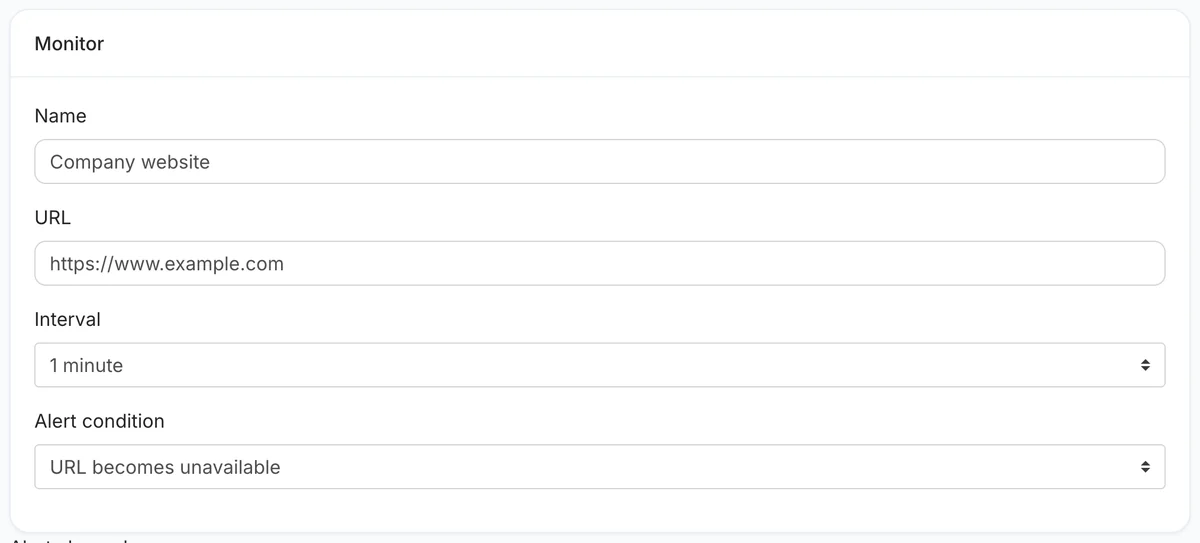 Name and URL. The name is the first thing every alert says.
2. Choose the interval
The interval is the longest an outage can go unnoticed. Options run from every minute to every hour; the fastest your plan allows is shown at the top of the list.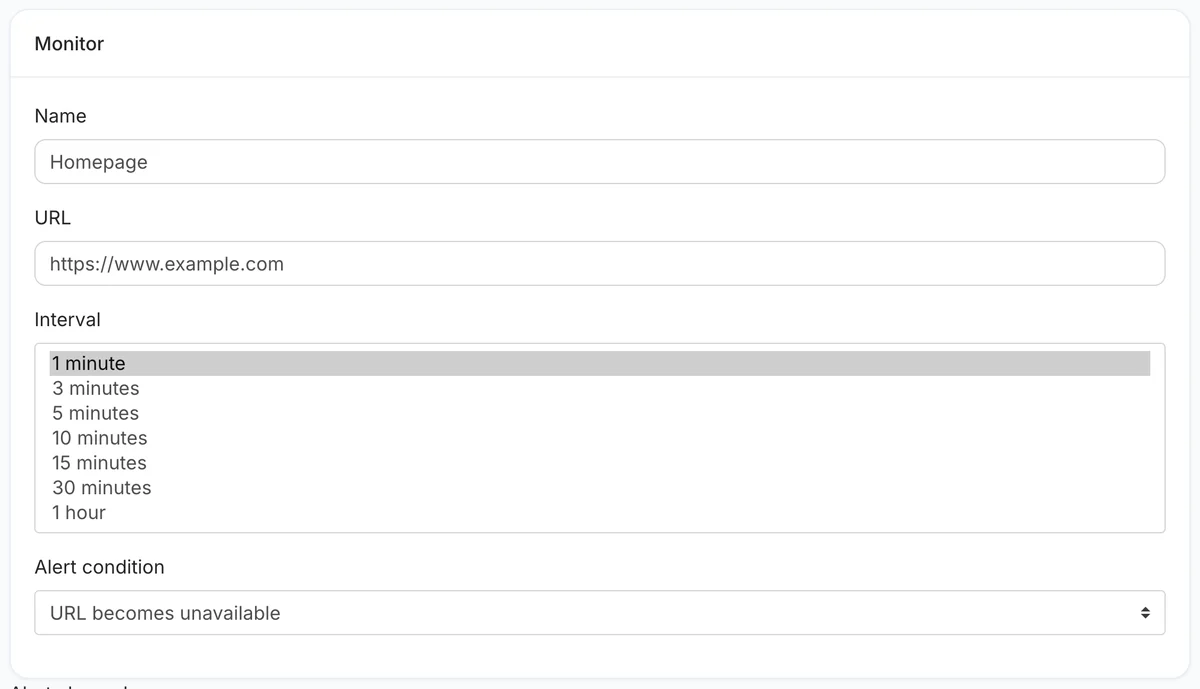 Every interval, from one minute to one hour.
3. Decide what "down" means
With URL becomes unavailable, a timeout, a connection failure, a DNS failure or any status outside 200–299 counts as down. If your site can show an error page with a 200 status, choose URL response does not contain text and enter a phrase that only appears when the page works.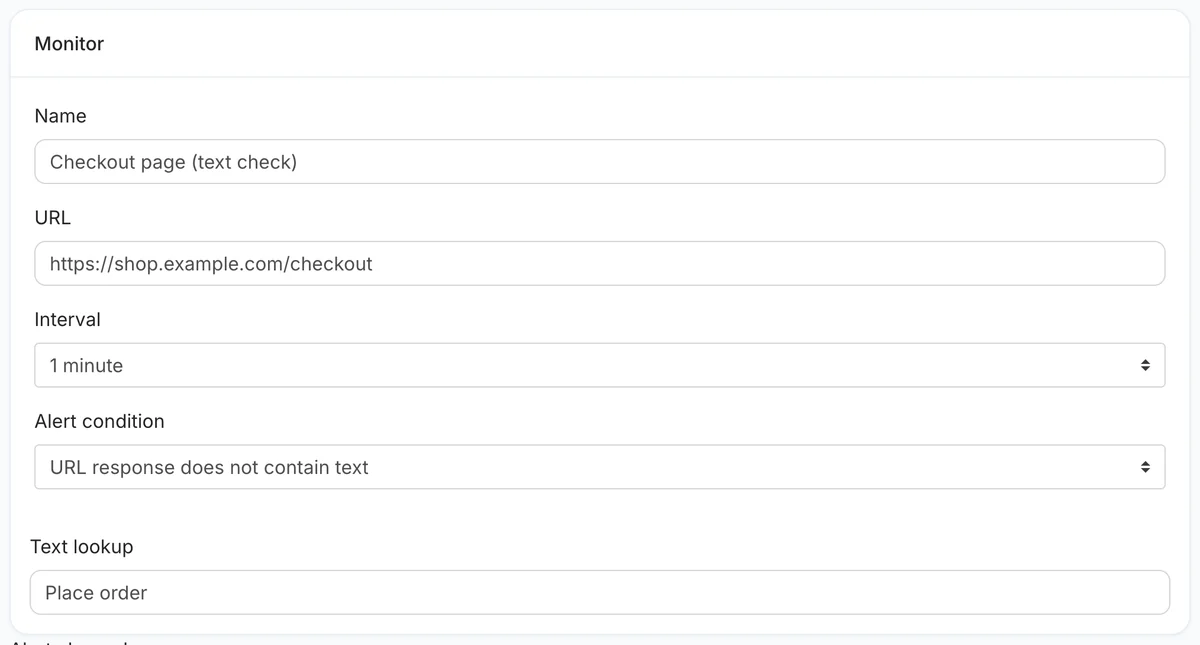 A text check catches the error page that still returns 200.
4. Add alert channels
Click + under Alert channels and add email plus a team channel. Alerts go out once when the site goes down — after an immediate re-check confirms it — and once when it recovers.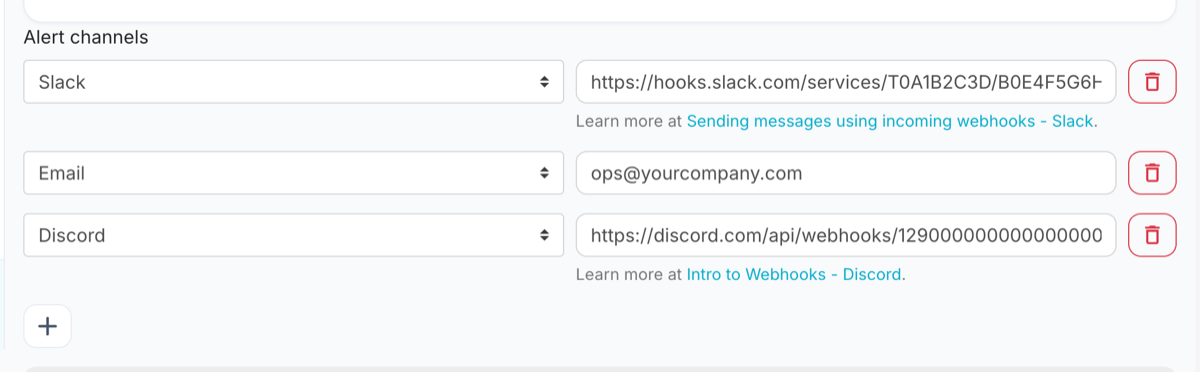 Several channels on one monitor, all notified together.
5. Save and read the overview
Checking starts straight away. The overview shows uptime, response times, recent checks and any incidents.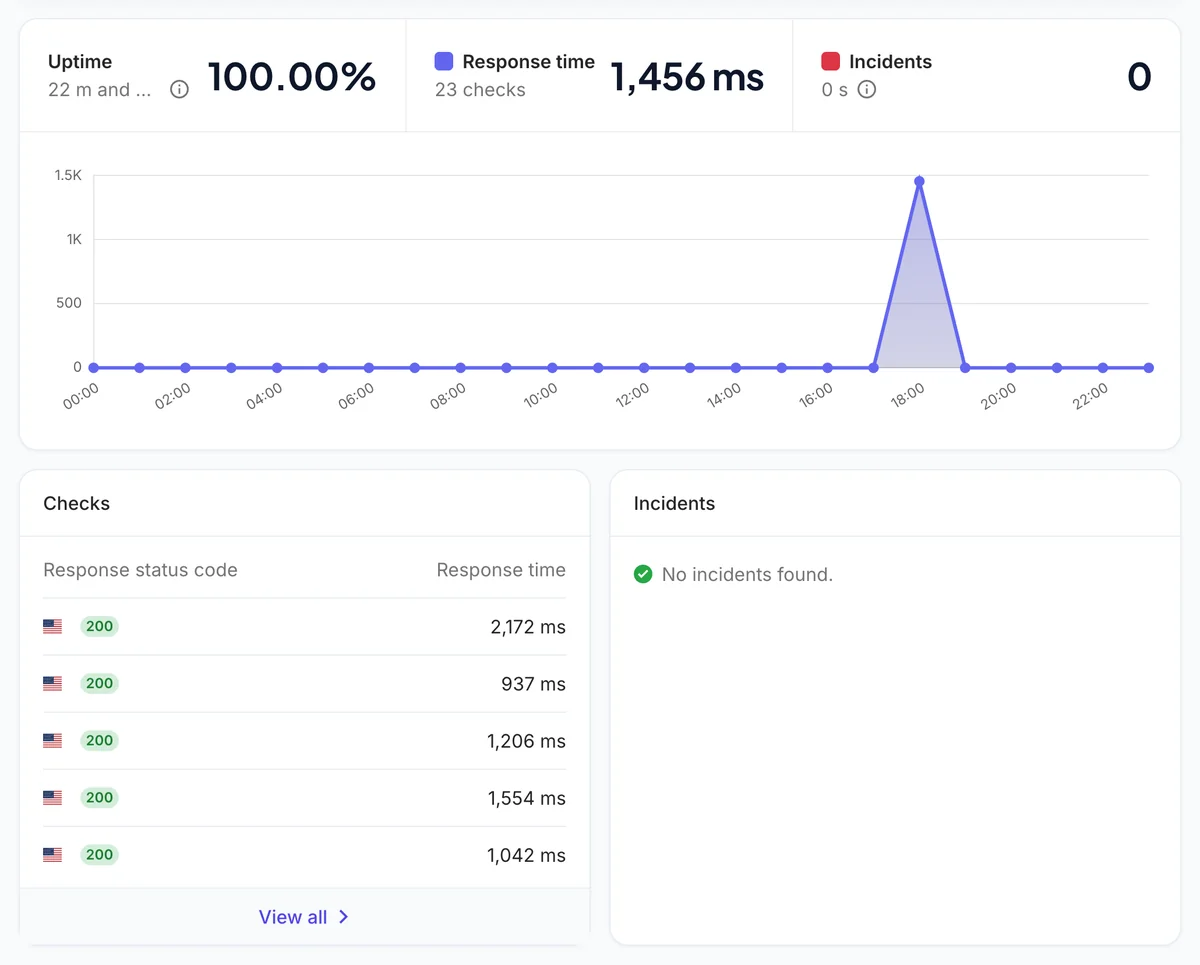 The overview after the first checks.
A 200 does not mean the page works
This is the single most common gap between what a monitor reports and what a customer experiences.
A web server returns 200 when it successfully sent you something. It makes no claim about whether that something was any good. A page whose database has gone away can render a friendly error inside a perfectly valid 200 response. A checkout whose payment provider is unreachable can show a spinner forever, and every single request behind that spinner returns 200. A site that has been replaced by a parked domain returns 200 with great enthusiasm.
The fix is to check for something that only appears when the page is genuinely working — a word in the order summary, a product price, the label on a submit button. If that string is missing, the check fails regardless of the status code. Pick something rendered late in the page and only on success, and avoid anything that changes legitimately, or you will be alerted every time the marketing copy is edited.
A keyword check is the difference between "the server responded" and "the page worked". If you set up only one thing beyond the URL itself, make it this.
How often should you check?
The honest answer is: as often as your plan allows, but the difference matters less than people expect.
The interval sets your worst-case detection delay. A five-minute check means an outage that starts just after a check is discovered up to five minutes later, plus the time to confirm it. A sixty-second check narrows that window to about a minute. What it does not do is make your site more reliable, and it does not help at all if nobody is looking at the alerts.
For most sites, five minutes is the sensible default. Go to sixty seconds for checkout flows, payment callbacks, login endpoints and APIs other people build against — anywhere a few minutes of silence has a number attached to it. Thirty minutes is fine for a brochure site whose worst outcome is a missed enquiry.
| What you are checking | Suggested interval | Why |
|---|---|---|
| Checkout, payments, login | Every 60 seconds | Minutes of downtime convert directly into lost orders |
| An API others depend on | Every 60 seconds | Your outage becomes their outage, and their support ticket |
| Main marketing site | Every 5 minutes | Fast enough to act on, quiet enough to trust |
| Blog, docs, brochure pages | Every 15-30 minutes | Nothing here is time-critical |
| Staging and internal tools | Every 30 minutes | Useful signal, not worth waking anyone |
Settings worth thinking about
The defaults are sensible. These are the ones where the right answer depends on your site.
Check the URL people actually use
Monitor the canonical address, including the www or lack of it, exactly as customers reach it. Checking a URL that immediately redirects tests the redirect as much as the site. If both hostnames must work, monitor both.
Do not monitor a page that is expensive to render
A check every minute against a report that takes eight seconds and three database queries is a small, permanent load you have chosen to add. Point the monitor at something cheap and representative, or add a lightweight health endpoint that touches the things you care about and returns quickly.
Request method and headers
GET is right for almost everything. POST, custom headers and basic authentication are there for API endpoints that need them. If your endpoint requires a token, use one scoped to nothing but this check.
The cache buster
A CDN can happily serve a cached copy of your homepage long after the origin behind it has died, and your monitor will see 200 the whole time. The cache buster appends a unique parameter to each request so the check reaches the origin rather than the edge. Turn it on when a CDN sits in front of the site.
SSL and domain expiry
Both ride along with the monitor and cost nothing extra. A certificate that expires at 2am on a Sunday takes the site down just as thoroughly as a crashed server, and unlike a crash, it is entirely predictable and entirely preventable.
Troubleshooting
Four things that look like bugs and usually are not.
It says down, but the site loads for me
Your browser has DNS caches, a session cookie and possibly a different network route. The usual causes are a firewall or WAF blocking an unfamiliar client, rate limiting that treats a regular request as suspicious, or geo-blocking. Allow-listing the checker resolves nearly all of these.
It alerts and recovers repeatedly
Flapping almost always means the site is genuinely marginal — a server near its memory limit, a connection pool that empties under load, a host that throttles at intervals. Widening the interval hides it rather than fixing it. Treat the pattern as the finding.
It says up but customers say otherwise
This is the 200-that-is-not-working case above. Add a keyword check for a string that only appears when the page is genuinely functional, and it stops happening.
The keyword check fails on a working page
Usually the string is rendered by JavaScript after load, and the check reads what the server sent. Choose a phrase present in the server-rendered HTML, or watch the page with a browser-rendering watch instead.
How to set up website uptime monitoring
Add an external check on your site and get alerted when it stops responding correctly.
Add the URL
Paste the address exactly as customers reach it, including https and the www or lack of it.
Choose an interval
Five minutes suits most sites; use sixty seconds for checkout, login and APIs others depend on.
Decide what counts as broken
A failed request is the default. Add a keyword that only appears when the page genuinely works, so a 200 hiding a broken page still fails the check.
Add your alert channels
Email on any plan; Slack, Teams, Discord, Telegram, Flock and webhooks on paid plans. Send them where your team already looks.
Turn on SSL and domain expiry
Both ride along with the monitor at no extra cost and catch the two outages you can see coming.
Save and leave it alone
Checking starts immediately. Incidents open and close on their own, so there is nothing to acknowledge or reset by hand.
Typically about 3 minutes from start to finish.
What it costs
Uptime monitors, watched pages and heartbeats each get their own allowance, so adding a page watch never costs you a monitor. SSL and domain checks ride along with the monitor they belong to and use nothing extra.
| Plan | Monitors | Watched pages | Heartbeats | Fastest interval | Alert channels | Price |
|---|---|---|---|---|---|---|
| Starter | 25 | 25 | 25 | Every 5 minutes | Email + webhook & chat | $5/mo |
| Basic | 10 | 10 | 10 | Every 10 minutes | Email + webhook & chat | $8/mo |
| Growth | 50 | 50 | 50 | Every 5 minutes | Email + webhook & chat | $19/mo |
| Pro | 100 | 100 | 100 | Every 60 seconds | Email + webhook & chat | $34/mo |
Annual billing is cheaper on every paid tier. The pricing page is the authoritative list.
What an alert actually looks like
Every recorded change is compared word by word and kept with a before-and-after image. This is the real output, shown with worked example data.
Price fell from $49 to $39, and an annual discount was added.
The item is available again and the basket button returned.
A new subprocessor was added in another jurisdiction.
Where we can reach you
The free plan sends to one email address. Every paid plan adds the chat and webhook channels below, with 2 to 10 destinations depending on the plan. However many alerts you receive, the price does not change — nothing here is metered or charged per alert.
There are no voice calls and no SMS. If a phone call at 3am is a hard requirement, say so before you subscribe — we would rather tell you now than refund you later.
Website uptime monitoring questions
What is website uptime monitoring?
A service outside your infrastructure that requests your site on a schedule and records the response. When the response stops matching what you defined as healthy, it opens an incident and alerts you; when it recovers, it closes the incident. The value is entirely in it being external — a server cannot report its own outage.
Why can't I just use my server logs or an error tracker?
Because both live on the machine that failed. They are excellent at explaining what a running application did and completely silent when the process is gone, the disk is full or the host has stopped routing traffic. An external check is the only thing that keeps working when the thing you are checking does not.
How quickly will I be told?
Within roughly one interval plus the time to confirm the failure. On a five-minute check that is usually five to six minutes; on a sixty-second check, one to two. We deliberately re-check before alerting, because a monitor that fires on a single dropped packet is one you will stop reading.
What counts as down?
By default: a connection that times out, is refused or fails DNS, and any 4xx or 5xx response. You can also fail a check when an expected word is missing from the page, which catches the common case of a broken page still returning 200.
Will monitoring slow my site down?
No. One request every few minutes is far less traffic than a single visitor browsing a handful of pages. The only case worth thinking about is pointing a sixty-second check at a page that is genuinely expensive to render.
Can I monitor a page behind a login?
Yes, if it can be reached with a request — basic authentication, a header or a token. If it needs a full browser session and JavaScript, use a page watch with browser rendering instead. Whatever credential you use, scope it to this check and nothing else.
Does it check from multiple countries?
No. Checks run from our own infrastructure, which is external to yours, but from a single origin rather than a global probe network. That is enough to catch outages independently of your stack. It is not enough to tell you a site is down in Frankfurt but up in Ohio — if regional verification is a hard requirement, a larger platform will serve you better and we would rather say so here.
Why did I get an alert when my site was clearly fine?
Most often a firewall, WAF or rate limiter blocking an unfamiliar client, or a brief network problem between us and you. Allow-listing the checker fixes the first. Repeated flapping usually means the site really is marginal, and is worth investigating rather than silencing.
What is the cache buster for?
A CDN can serve a cached copy of your page long after the origin behind it has died, so the check sees 200 throughout an outage. The cache buster adds a unique parameter to each request so it reaches the origin. Turn it on if a CDN sits in front of your site.
How many monitors do I get?
One on the free plan, ten on Basic ($8/mo), twenty-five on Founding Member ($5/mo), fifty on Growth and a hundred on Pro. Page watches and heartbeats have their own separate allowances, so adding one never costs you a monitor.
Do SSL and domain checks use up a monitor?
No. Both attach to a monitor you already have and cost nothing extra. A certificate or domain expiry takes a site down exactly as effectively as a crashed server, with the advantage that you can see it coming weeks in advance.
What happens when the site comes back?
The incident closes automatically on the first successful check and you are told it recovered, through the same channels that told you it was down. Nothing needs acknowledging or resetting.
Related monitoring guides
- SSL certificate monitoringThe outage you can see coming
- Cron job monitoringFor work that should have happened
- Website change detectionFor pages whose wording matters
- updown.io reviewPay-as-you-go, one credit per check
- HetrixTools reviewFree tier with blacklist monitoring
- Host-Tracker review300+ locations, false-alarm protection
- Pulsetic reviewFree status pages on your own domain
- MonSpark reviewThe widest list of monitor types
- Checkly reviewPlaywright tests as monitors
- Oh Dear reviewEvery check type on every plan
Last updated May 31, 2026 · Written by Amit Gupta, founder of MonitoringDaddy
Find out before your customers do.
The free plan includes a monitor, needs no card, and takes about a minute to set up.