REST API monitoring automatically checks whether your API endpoints are reachable, returning correct status codes, and responding with expected data — and alerts you the instant something breaks. This guide shows you exactly how to set up REST API monitoring in MonitoringDaddy in minutes.
What Is REST API Monitoring?
REST API monitoring sends scheduled HTTP requests to your API endpoints from external servers and verifies that each response is healthy. A healthy response typically means the correct HTTP status code (such as 200 OK), an acceptable response time, and — optionally — the presence of a specific keyword or JSON field in the body.
Unlike website uptime monitoring, which focuses on whether an HTML page loads, REST API monitoring is purpose-built for machine-to-machine interfaces: it supports custom HTTP methods (GET, POST, PUT, DELETE), request headers, Bearer token authentication, JSON payloads, and response-body assertions. This makes it the right tool for checking health endpoints, third-party integrations, payment gateways, authentication services, and any other JSON API your application depends on.
Why REST API Monitoring Matters
- APIs fail silently. A broken endpoint rarely triggers a visible error on your front end — users just experience weird behaviour or missing data. Monitoring catches it before they do.
- Third-party dependencies. Your app may call dozens of external APIs. If a payment processor or shipping API goes down, you need to know immediately.
- Deployment regressions. New code can break an endpoint that was working fine. Continuous monitoring catches regressions within minutes of a deploy.
- SLA and uptime reporting. Historical uptime data gives you evidence for SLA compliance and helps engineering teams prioritise reliability work.
- Security token expiry. API keys and Bearer tokens expire. A monitor that checks an authenticated endpoint will alert you when credentials stop working.
How REST API Monitoring Works in MonitoringDaddy
At the chosen interval, MonitoringDaddy sends an HTTP request to your endpoint using the method, headers, and body you configured. It checks the HTTP status code against your expected value, optionally scans the response body for a keyword or JSON string, and records the round-trip response time. If the check fails — wrong status code, missing keyword, timeout, or network error — an alert is dispatched to every channel you configured (email, webhook, Slack, Discord, and more). When the endpoint recovers, a recovery notification follows automatically.
You can also pair API monitoring with keyword monitoring to validate that specific fields appear in JSON responses, providing deeper functional coverage beyond a simple status-code check.
Before You Begin
- Confirm your API URL starts with
https://— plainhttp://endpoints are supported but a secure endpoint is strongly recommended. - Know the correct HTTP method your endpoint expects (
GETfor read operations,POSTfor create or action endpoints, etc.). - Gather any authentication details: Bearer token, API key header, or HTTP Basic credentials.
- Decide what a "healthy" response looks like: expected status code (usually
200) and, optionally, a word or phrase that always appears in a healthy JSON response body. - Have at least one alert channel ready — an email address or a Slack/Discord/Teams webhook URL.
How to Set Up REST API Monitoring (Step by Step)
API monitors live under Monitors → API and use the same checks as uptime monitors, with the request settings you need for an API.
Step 1: Monitors → API → New API monitor
Name the monitor after the endpoint and enter its full URL — ideally a dedicated health endpoint such as /v1/health.
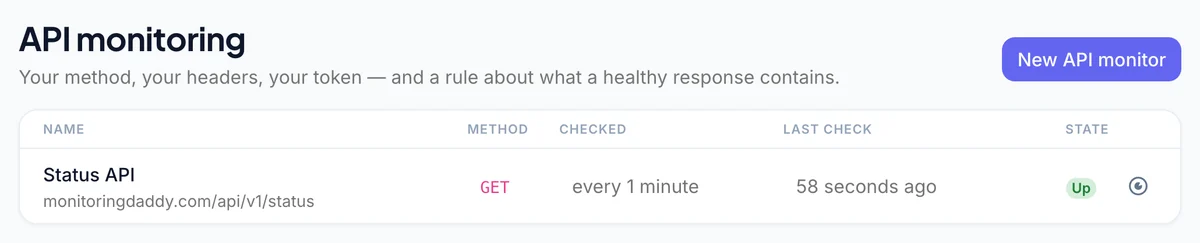 The API list.
Step 2: Check the response body
Set Alert condition to URL response does not contain text and enter something only a healthy response contains, such as "status":"ok". Many APIs return 200 with an error in the body; this catches them.
Step 3: Method, headers and authentication
Click Request. Choose GET, POST, HEAD, PUT, DELETE, PATCH or OPTIONS; add headers such as Authorization: Bearer … or Accept: application/json; fill in HTTP basic authentication if the endpoint uses it; and turn on Cache buster if a cache might answer instead of the API.
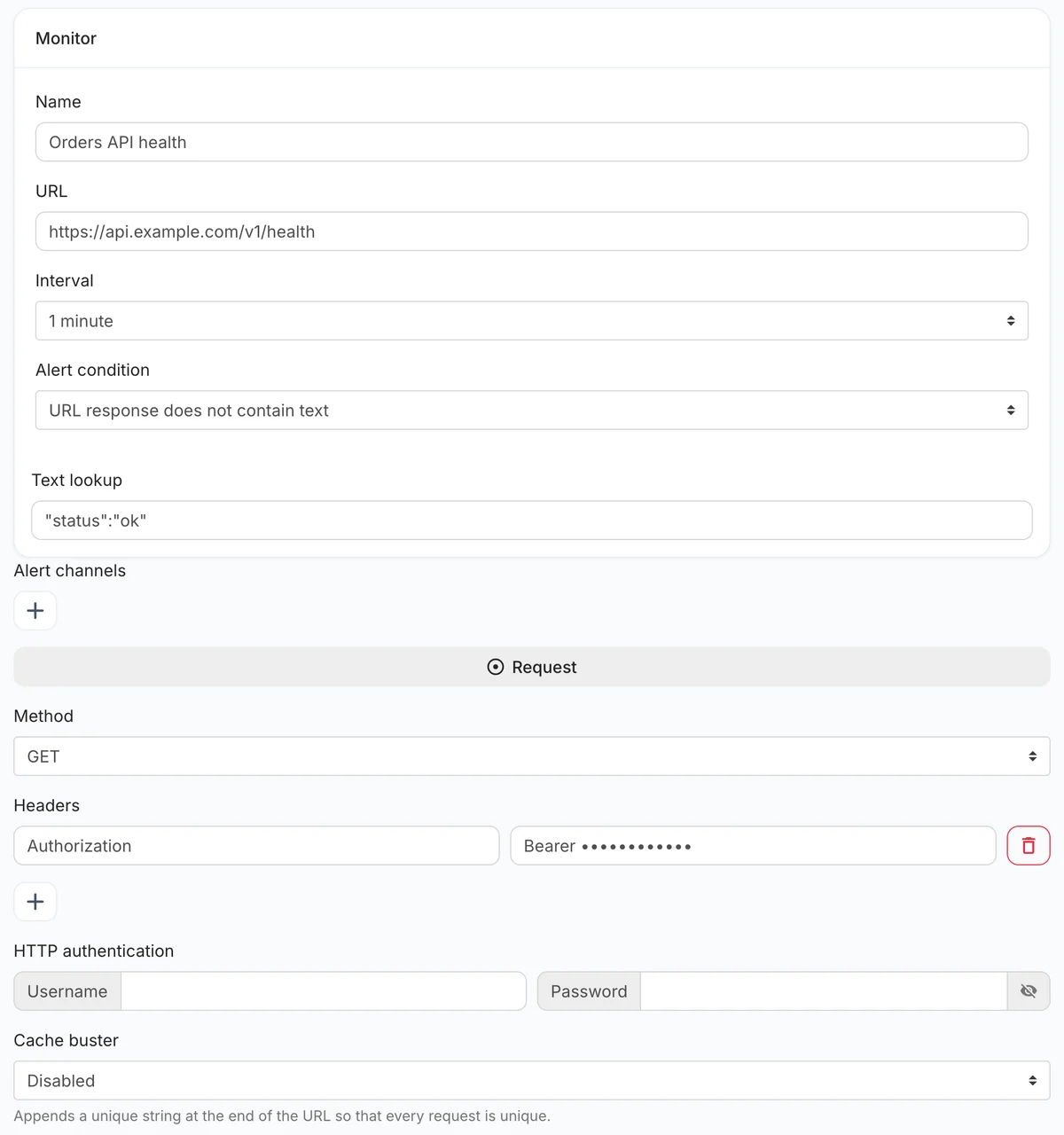 Text check, method, headers and authentication on one form.
Step 4: Alert channels and save
Add email plus a team channel and save. The overview then charts response times and lists each check's status code.
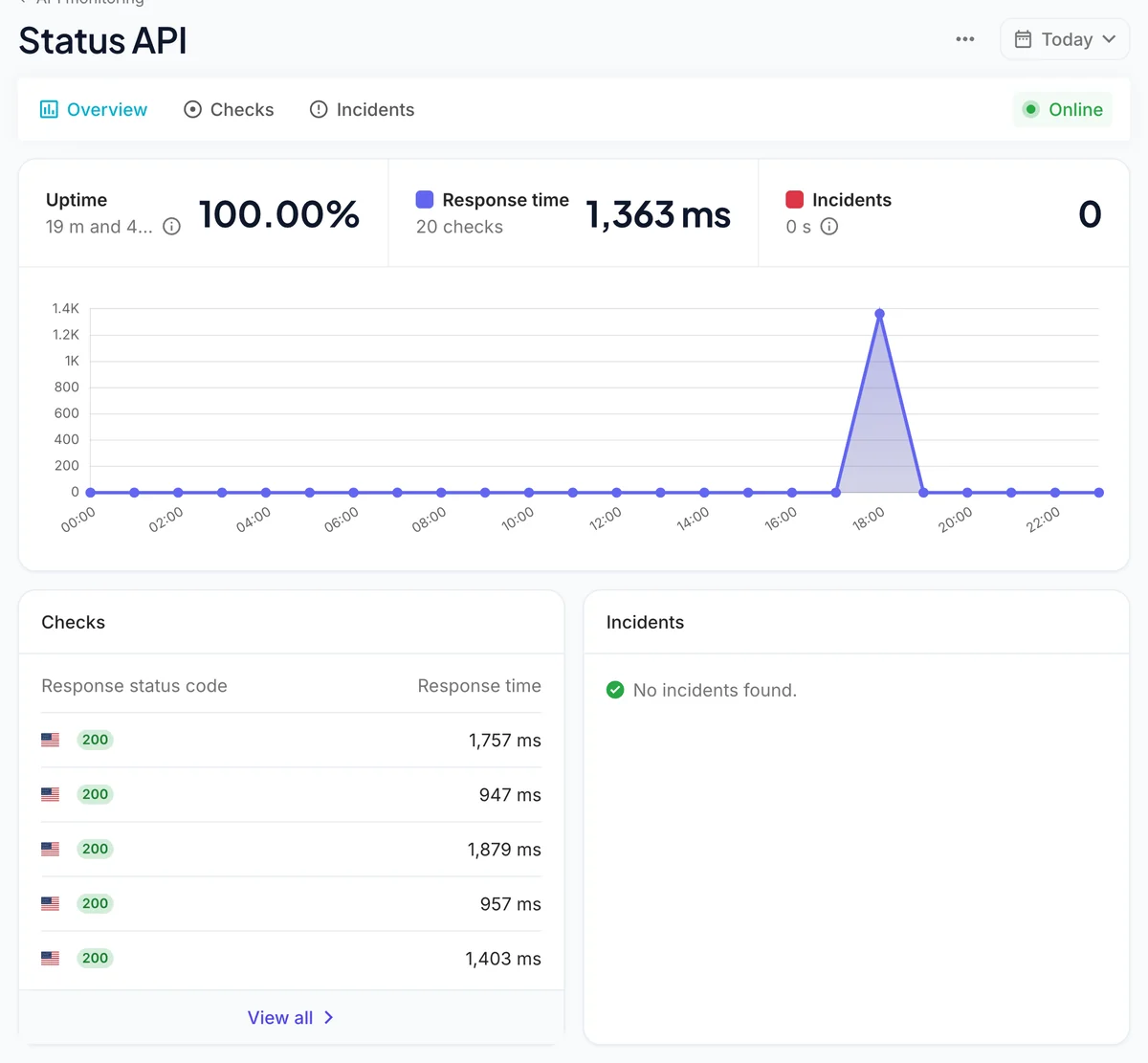 Response times and status codes per check.
Recommended REST API Monitoring Configuration
| Setting | Recommended |
|---|---|
| Name | Orders API — health |
| URL | https://api.example.com/v1/health |
| Interval | 1–5 minutes |
| Alert condition | URL response does not contain text: "status":"ok" |
| Method | GET |
| Headers | Authorization: Bearer (a read-only monitoring token) |
| Cache buster | On if a CDN or gateway caches responses |
| Alert channels | Email + a team chat channel or webhook |
Use a token with the least access that still reaches the endpoint — it is stored with the monitor. For certificate expiry on the API's hostname, add a separate SSL monitor.
Advanced Configuration: POST Endpoints
You can send a POST, PUT or PATCH request, with headers, but MonitoringDaddy does not send a request body. That means endpoints that need a JSON payload — a login call, a search with parameters — cannot be exercised directly. The practical pattern is a small GET /health (or /v1/status) endpoint in your API that performs the real work internally — a database read, a token issue, a call to a dependency — and returns "status":"ok" only when all of it succeeded. Monitor that with a text check.
Best Practices for REST API Monitoring
- Use a dedicated health endpoint. A lightweight
/healthor/statusroute avoids hitting rate limits, triggering side effects, or polluting your analytics. - Monitor critical paths end-to-end. In addition to the health endpoint, monitor the endpoints your users depend on most — search, checkout, user profile — so you catch partial failures.
- Rotate monitoring credentials separately. Use a dedicated low-privilege API key for monitoring. That way, rotating production keys does not break your monitors, and vice versa.
- Add response-body assertions. A
200 OKfrom a broken API is worse than a500— it masks the problem. Always add a keyword check for a field that only appears in healthy responses. - Set alert channels for multiple people. Route critical API alerts to a shared Slack channel so the whole team can respond, not just whoever checks email first.
- Complement with server monitoring. API-level monitoring tells you the endpoint is failing; server monitoring tells you why — high CPU, full disk, or memory exhaustion.
Troubleshooting Common Issues
Monitor shows DOWN immediately after setup
Check that the URL is correct and includes https://. Test it in a browser or with curl from your machine. If it loads locally, ensure the endpoint is publicly accessible and not blocked by a firewall or VPN requirement.
401 Unauthorized errors
Your authentication header is missing, malformed, or the token has expired. Double-check the header name (case matters for some APIs) and verify the token is still valid. Consider using a long-lived service account token for monitoring purposes.
Monitor reports UP but the app is broken
Add a response-contains assertion targeting a field that only appears in healthy responses. A /health endpoint returning {"status":"degraded"} with a 200 status code will pass a plain status-code check but fail a keyword check for "status":"ok".
Intermittent timeouts
Occasional timeouts may indicate slow database queries, cold starts (serverless functions), or network congestion. Check your server's response-time history on the MonitoringDaddy dashboard and consider enabling server monitoring to correlate API slowness with resource utilisation.
Next Steps
Once your first REST API monitor is live, expand your coverage with these complementary monitors:
- Add more endpoint monitors for every critical API path your application depends on.
- Enable keyword monitoring for APIs where response-body validation is critical.
- Set up server monitoring to correlate API failures with underlying infrastructure metrics.
- Review pricing plans to find the right check interval and monitor count for your team.
Frequently Asked Questions
What is REST API monitoring?
REST API monitoring automatically sends HTTP requests to your API endpoints at regular intervals and checks that each response has the correct status code, acceptable response time, and expected content. If a check fails, you receive an instant alert so you can resolve the issue before it affects users.
What HTTP methods does MonitoringDaddy support for API monitoring?
MonitoringDaddy supports GET, POST, PUT, PATCH, and DELETE methods. GET is recommended for health checks and read-only endpoints. POST is used when the endpoint requires a request body, such as a login or data-submission endpoint.
How do I monitor an API that requires a Bearer token?
Add a custom header with the name Authorization and the value Bearer YOUR_TOKEN. MonitoringDaddy includes this header in every request to the endpoint. Use a dedicated low-privilege token for monitoring so you can rotate it independently of your production credentials.
Can MonitoringDaddy check the response body, not just the status code?
Yes. Use the response-contains check to specify a keyword or JSON string that must appear in the response body for the endpoint to be considered healthy. For example, checking for "status":"ok" ensures your API is genuinely healthy, not just returning a 200 status code while reporting an internal error in the body.
How quickly will I be alerted when my API goes down?
You are alerted within one check interval of the failure occurring. If you use a 1-minute interval, you are notified within about a minute. With a 5-minute interval, alerts arrive within 5 minutes. Recovery notifications are also sent automatically once the endpoint is healthy again.
Should I enable SSL and domain monitoring for my API?
SSL monitoring is recommended for production APIs because an expired certificate causes client connections to fail immediately. Domain monitoring is optional and only needed if you also want alerts before the domain registration expires. Neither is required for the basic API uptime check to function.
What is the cache buster and why should I enable it?
The cache buster appends a unique random parameter to each request URL, preventing CDNs, reverse proxies, and API gateways from returning a cached response instead of hitting your live server. Enabling it ensures every check reflects the true current state of your API.
How is REST API monitoring different from website uptime monitoring?
Website uptime monitoring checks whether an HTML page loads correctly and is mainly used for public-facing websites. REST API monitoring is designed for JSON APIs and supports custom HTTP methods, request headers, authentication tokens, request bodies, and response-body keyword assertions, making it the right choice for monitoring API endpoints and microservices.