The Nagios alternative you do not have to run
Nagios is the original open-source monitoring system, and thirty years of plugins mean it can check essentially anything — including whether a scheduled job reported in, whether a certificate is expiring and whether a domain is about to lapse. It is also a system you operate.
From $5 a month · No check quotas · Set up in under a minute
Is MonitoringDaddy a real Nagios alternative?
For teams who want those checks without running and maintaining a monitoring server, yes. Nagios is the better choice if you monitor internal infrastructure, need arbitrary custom checks, or already have the expertise and want to pay nothing.
Why people look for a Nagios alternative
Self-hosted monitoring shares your fate
If your infrastructure has a problem, so does the thing watching it — and nothing tells you.
Configuration is a skill
Nagios configuration is powerful and famously unfriendly.
You may only need the outside view
Much of what Nagios does is internal. Websites, certificates and jobs can be watched from outside with no server at all.
Nagios vs MonitoringDaddy
Green marks the stronger option on that row. Third-party pricing and limits change without notice — treat the Nagios column as a starting point and confirm current figures on their site before you decide.
| Feature | Nagios | MonitoringDaddy |
|---|---|---|
| Passive checks for scheduled jobs | Yes — the classic pattern | Yes — heartbeats, 1 on free to 100 on Pro |
| Internal infrastructure monitoring | Yes — hosts, services, anything with a plugin | No — external checks only |
| Custom checks | Yes — write any plugin you like | No |
| Cost | Free (Nagios Core) | $5/mo for 25 of each monitor type |
| Maintenance | Yours — server, updates, backups, and it stops when your server does | None |
| Setup effort | Substantial — configuration files and plugins | About a minute |
| SSL and domain expiry | Yes, via plugins | Yes — attached to any monitor, no extra allowance |
| Website change detection | No | Yes, with word-level diffs and images |
| Hosted status page | No | Yes, included on every plan |
| Survives your own outage | No | Yes — hosted externally |
What Nagios does better
Every comparison page on the internet claims the author's product wins on everything. Here is where it does not.
- Free and open source, with a plugin for essentially any check you can imagine.
- Monitors internal infrastructure that an external service can never reach.
- Thirty years of accumulated plugins, documentation and community knowledge.
If any of those are load-bearing for your team, staying put is the correct decision and this page has done its job. Monitoring you actually trust beats monitoring that is marginally cheaper.
What you actually get with MonitoringDaddy
Six monitor types and one dashboard. No add-on products, no separate SKUs for the features you assumed were included.
Uptime monitoring
HTTP checks from external infrastructure, as often as every 60 seconds, with downtime and recovery alerts. See the uptime setup guide.
SSL certificate expiry
A dedicated monitor type with configurable advance warnings, so a certificate never lapses because nobody owned the renewal. See SSL expiry monitoring.
Domain expiry
Registration expiry tracked as its own monitor, warning you months ahead. The outage nobody has a runbook for. See domain expiration monitoring.
Content change detection
Alert when a phrase appears or disappears on a page — defacement, stock changes, silent policy edits. See website change detection.
Price monitoring
Watch a competitor or supplier price string and get told the moment it moves. See the price monitoring guide.
Hosted status pages
Public status pages included on every plan, hosted independently of your infrastructure so they stay up when you do not. See hosted status pages.
Alerts from any of these can be routed to email, Slack, Microsoft Teams, Discord, Telegram, Flock or a generic webhook, and a single monitor can carry several channels at once. Everything is available through the REST API on paid plans, so monitors can be created and torn down programmatically rather than clicked through a form.
Who should switch — and who should stay
Switch if…
- You want the external checks without running a server.
- You need page-change monitoring or a hosted status page.
- Nagios configuration is more than the problem deserves.
Stay on Nagios if…
- You monitor internal infrastructure — we cannot reach it.
- You need arbitrary custom checks.
- You have the expertise and want zero licence cost.
What MonitoringDaddy costs
Flat monthly tiers. No per-seat charges, no credit top-ups, no usage meters — the number below is the whole bill. There is no free plan; every tier can be cancelled at any time.
| Plan | Monitors | Fastest interval | Alert channels | API | Price |
|---|---|---|---|---|---|
| Starter | 25 | Every 5 minutes | Email + webhook & chat | Yes | $5/mo |
| Basic | 10 | Every 10 minutes | Email + webhook & chat | Yes | $8/mo |
| Growth | 50 | Every 5 minutes | Email + webhook & chat | Yes | $19/mo |
| Pro | 100 | Every 60 seconds | Email + webhook & chat | Yes | $34/mo |
Annual billing is cheaper on every paid tier. The pricing page is the authoritative list.
Moving from Nagios without a gap in coverage
There is no automated importer — monitors are re-created by hand, or scripted through the API. Budget about a minute per monitor. These are the real screens.
1. List what you actually monitor
Export or write down every active check in Nagios: the URL, how often it runs, what counts as a failure and who gets alerted. Most teams find checks nobody needs any more — this is the moment to drop them.
2. Re-create the important ones first
Open Cron jobs → New heartbeat for each job you had in Nagios: a name, how often it runs, and how late it may be.
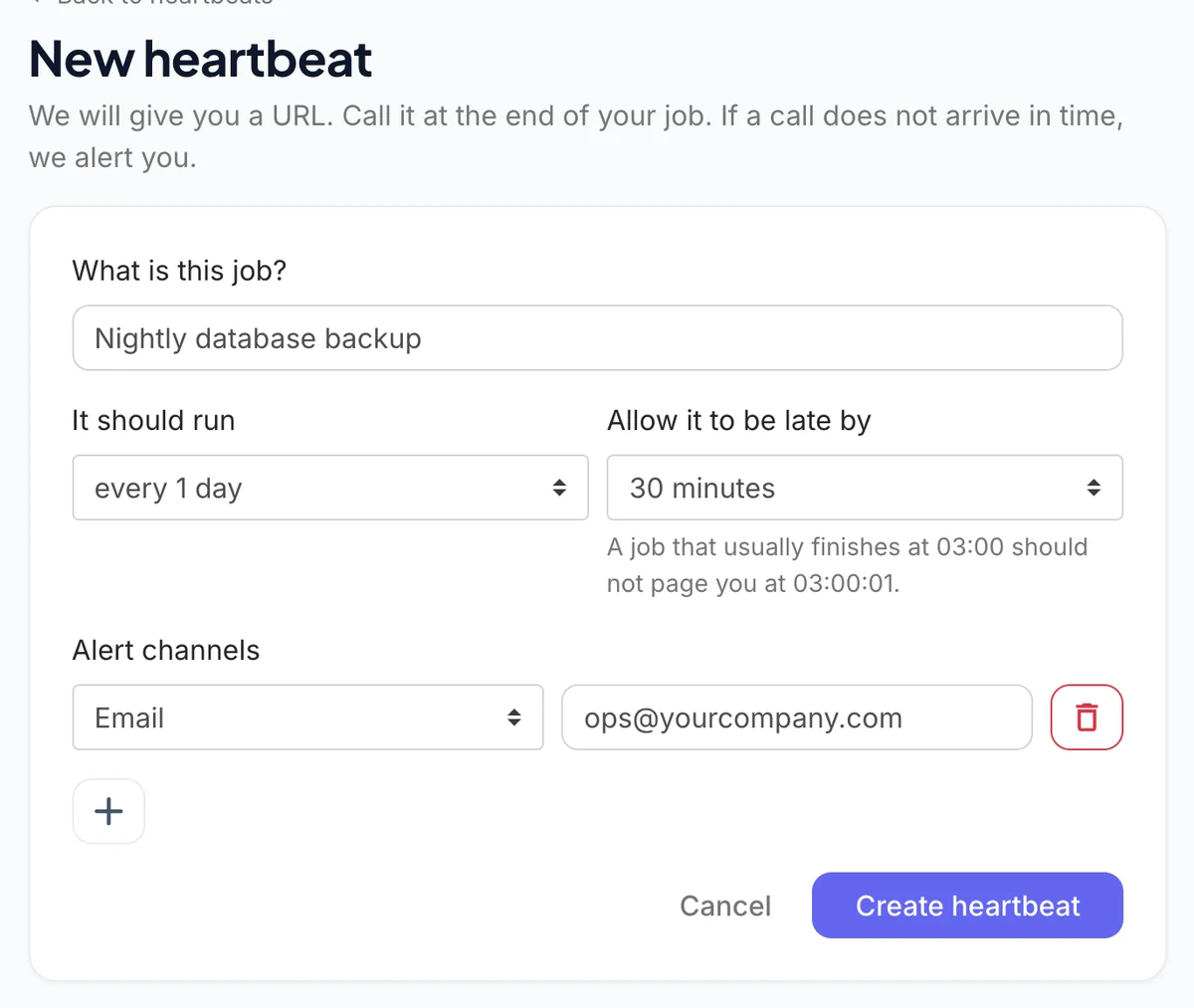 Name, schedule and allowed lateness.
Then click + under Alert channels and add the same destinations your team watches today — email, Slack, Microsoft Teams, Discord, Flock, Telegram or a webhook.
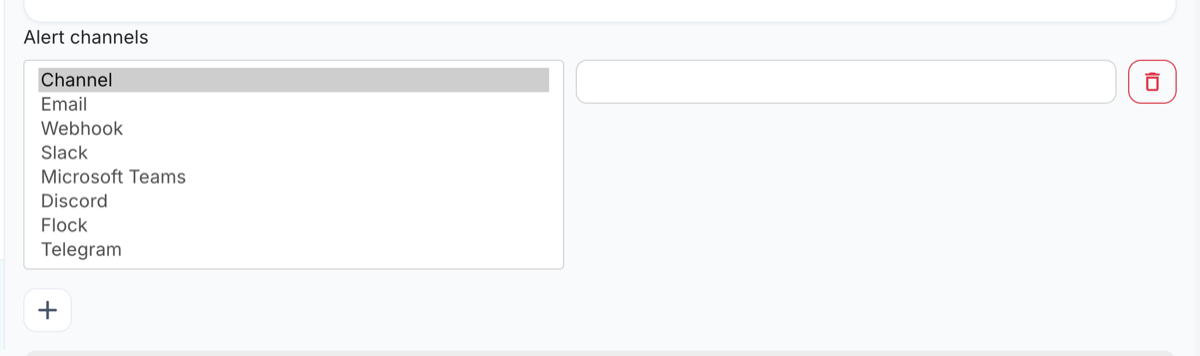 Alert channels available on every monitor.
3. Run both tools in parallel for a week
Each heartbeat gets its own ping URL with copy-paste examples. Add the new call next to the old Nagios one at the end of the job; while both run, both tools see every check-in.
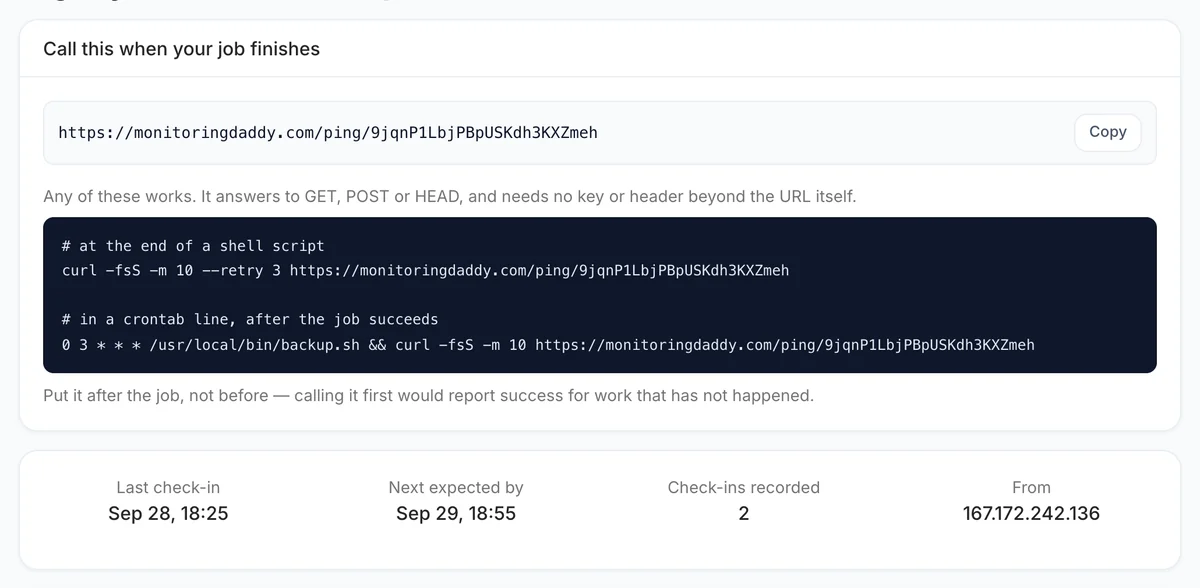 The ping URL and the last check-in.
4. Point your status page and cancel
Move any public status page across, confirm a full week of clean overlap, then cancel Nagios. Keep the export from step 1 — it is the easiest way to prove nothing was left behind.
How this comparison was put together
This page is written by the team that builds MonitoringDaddy, so treat it as an informed argument rather than a neutral audit. What we can promise is that the claims about our own product are checked against what the software actually does, and the rows where Nagios is stronger are marked as such rather than quietly omitted.
Details about Nagios come from their public pricing and documentation at the time of writing. Monitoring vendors change plan limits and prices frequently and without announcement, so every third-party figure here carries a "verify on their site" caveat and you should take it seriously before making a decision on cost.
One thing worth stating plainly, because most comparison pages fudge it: MonitoringDaddy checks run from our own infrastructure, which is external to yours, but from a single origin rather than a global probe network. That is enough to catch outages and content changes independently of your stack. It is not enough to tell you a site is down in Frankfurt but up in Ohio. If regional verification is a hard requirement, a larger platform will serve you better and we would rather you knew that now.
Found something out of date or wrong? Tell us and we will correct it.
What an alert actually looks like
Every recorded change is compared word by word and kept with a before-and-after image. This is the real output, shown with worked example data.
Price fell from $49 to $39, and an annual discount was added.
The item is available again and the basket button returned.
A new subprocessor was added in another jurisdiction.
Where we can reach you
The free plan sends to one email address. Every paid plan adds the chat and webhook channels below, with 2 to 10 destinations depending on the plan. However many alerts you receive, the price does not change — nothing here is metered or charged per alert.
There are no voice calls and no SMS. If a phone call at 3am is a hard requirement, say so before you subscribe — we would rather tell you now than refund you later.
Nagios alternative: your questions answered
Can Nagios monitor cron jobs?
Yes, with passive checks — the same pattern as our heartbeats. Your job reports in and you are alerted when it stops.
Why use a hosted tool instead?
Because a self-hosted monitor goes down with your infrastructure, and because setup here is about a minute rather than a configuration project.
Can you monitor internal servers?
No. We check from outside, so anything not publicly reachable is out of scope. That is a genuine reason to keep Nagios.
Do you do custom checks?
No plugin system. HTTP checks with headers, auth and keyword conditions is the extent of it.
Do both watch certificates?
Yes. Ours attaches to a monitor at no extra allowance; Nagios does it through a plugin you configure.
Can I run both?
Very commonly, yes — Nagios inside, hosted checks outside so something independent is watching.
Compare other monitoring tools
- CertPost alternativeHow MonitoringDaddy compares with CertPost
- updown.io alternativeHow MonitoringDaddy compares with updown.io
- HetrixTools alternativeHow MonitoringDaddy compares with HetrixTools
- Host-Tracker alternativeHow MonitoringDaddy compares with Host-Tracker
- Pulsetic alternativeHow MonitoringDaddy compares with Pulsetic
- MonSpark alternativeHow MonitoringDaddy compares with MonSpark
- UptimeRobot alternativeHow MonitoringDaddy compares with UptimeRobot
- Pingdom alternativeHow MonitoringDaddy compares with Pingdom
- StatusCake alternativeHow MonitoringDaddy compares with StatusCake
- Better Stack alternativeHow MonitoringDaddy compares with Better Stack
- Uptime Kuma alternativeHow MonitoringDaddy compares with Uptime Kuma
- Visualping alternativeHow MonitoringDaddy compares with Visualping
- Distill.io alternativeHow MonitoringDaddy compares with Distill.io
- ChangeTower alternativeHow MonitoringDaddy compares with ChangeTower
- changedetection.io alternativeHow MonitoringDaddy compares with changedetection.io
- Hexowatch alternativeHow MonitoringDaddy compares with Hexowatch
- Wachete alternativeHow MonitoringDaddy compares with Wachete
- Versionista alternativeHow MonitoringDaddy compares with Versionista
- Fluxguard alternativeHow MonitoringDaddy compares with Fluxguard
- PageCrawl.io alternativeHow MonitoringDaddy compares with PageCrawl.io
- Sken.io alternativeHow MonitoringDaddy compares with Sken.io
- Freshping alternativeHow MonitoringDaddy compares with Freshping
- Site24x7 alternativeHow MonitoringDaddy compares with Site24x7
- Hyperping alternativeHow MonitoringDaddy compares with Hyperping
- Cronitor alternativeHow MonitoringDaddy compares with Cronitor
- Healthchecks.io alternativeHow MonitoringDaddy compares with Healthchecks.io
- Dead Man's Snitch alternativeHow MonitoringDaddy compares with Dead Man's Snitch
- Cronhub alternativeHow MonitoringDaddy compares with Cronhub
- Sentry Crons alternativeHow MonitoringDaddy compares with Sentry Crons
- Oh Dear alternativeHow MonitoringDaddy compares with Oh Dear
- Uptime.com alternativeHow MonitoringDaddy compares with Uptime.com
- TrackSSL alternativeHow MonitoringDaddy compares with TrackSSL
- KeyChest alternativeHow MonitoringDaddy compares with KeyChest
- SSLMate Cert Spotter alternativeHow MonitoringDaddy compares with SSLMate Cert Spotter
- Atlassian Statuspage alternativeHow MonitoringDaddy compares with Atlassian Statuspage
- Instatus alternativeHow MonitoringDaddy compares with Instatus
- DomainMOD alternativeHow MonitoringDaddy compares with DomainMOD
- Uptrends alternativeHow MonitoringDaddy compares with Uptrends
- Checkly alternativeHow MonitoringDaddy compares with Checkly
- Postman Monitors alternativeHow MonitoringDaddy compares with Postman Monitors
- Qualys SSL Labs alternativeHow MonitoringDaddy compares with Qualys SSL Labs
- Venafi alternativeHow MonitoringDaddy compares with Venafi
- Keyfactor alternativeHow MonitoringDaddy compares with Keyfactor
- DigiCert CertCentral alternativeHow MonitoringDaddy compares with DigiCert CertCentral
- Red Sift Certificates alternativeHow MonitoringDaddy compares with Red Sift Certificates
- Sematext Synthetics alternativeHow MonitoringDaddy compares with Sematext Synthetics
- Datadog alternativeHow MonitoringDaddy compares with Datadog
- Status.io alternativeHow MonitoringDaddy compares with Status.io
- Freshstatus alternativeHow MonitoringDaddy compares with Freshstatus
- Statuspal alternativeHow MonitoringDaddy compares with Statuspal
- Cachet alternativeHow MonitoringDaddy compares with Cachet
- Upptime alternativeHow MonitoringDaddy compares with Upptime
- Hund alternativeHow MonitoringDaddy compares with Hund
- StatusGator alternativeHow MonitoringDaddy compares with StatusGator
- Sorry alternativeHow MonitoringDaddy compares with Sorry
- Dotcom-Monitor alternativeHow MonitoringDaddy compares with Dotcom-Monitor
- DomainTools alternativeHow MonitoringDaddy compares with DomainTools
- WhoisXML API alternativeHow MonitoringDaddy compares with WhoisXML API
- Domsignal alternativeHow MonitoringDaddy compares with Domsignal
- Assertible alternativeHow MonitoringDaddy compares with Assertible
- BlazeMeter API Monitoring alternativeHow MonitoringDaddy compares with BlazeMeter API Monitoring
- APIContext alternativeHow MonitoringDaddy compares with APIContext
- New Relic Synthetics alternativeHow MonitoringDaddy compares with New Relic Synthetics
- Treblle alternativeHow MonitoringDaddy compares with Treblle
- Moesif alternativeHow MonitoringDaddy compares with Moesif
- Testfully alternativeHow MonitoringDaddy compares with Testfully
- RapidAPI Testing alternativeHow MonitoringDaddy compares with RapidAPI Testing
- Zabbix alternativeHow MonitoringDaddy compares with Zabbix
- Prometheus Pushgateway alternativeHow MonitoringDaddy compares with Prometheus Pushgateway
- DNSSpy alternativeHow MonitoringDaddy compares with DNSSpy
- Hexometer alternativeHow MonitoringDaddy compares with Hexometer
- Website change detectionGet alerted the moment a page changes
- Complete setup guideEvery monitor type, start to finish
- Hosted status pagesTell customers before they ask
Last updated August 4, 2026 · Written by Amit Gupta, founder of MonitoringDaddy
Try it before you cancel anything.
Set up a monitor on your most important URL and run it alongside Nagios for a week. Plans from $5 a month, cancel any time.